
100 Exercises / System Development / 100 Exercise on System Development
Creating a Maintenance API for Manufacturing with FastAPI | CRUD, Input Validation, and SQLite Implementation
Build and test a maintenance API with FastAPI, Pydantic, and SQLite. Explore CRUD, validation, error responses, and OpenAPI in ten exercises.
Build a maintenance API with FastAPI: incident registration, progress updates, and database integration
Overview
When equipment incident reports are scattered across calls, paper, and spreadsheets, responses can be delayed and downtime patterns are hard to assess. This article uses a fictional precision parts factory to introduce FastAPI, GET/POST/PUT/DELETE, Pydantic validation, error handling, SQLite persistence, CRUD workflows, and Swagger UI.
Rather than simply memorizing HTTP methods, we connect it to manufacturing business design such as “who can change which state,” “how to prevent misinput and double registration,” and “how to return data necessary for on-site decision-making.” The target is the No.031〜No.040 of the “100 Exercises on System Development.”
About this material This article adapts notebooks used in corporate training by Surikobo or its representative, Hiroshi Wayama, with permission from the participating companies. All data is fictional and does not represent actual companies or factory results.
Introduction: Practical Challenges in Manufacturing Covered in This Article
This time, the subject is a fictional precision parts factory with processing and assembly lines. When equipment anomalies occur, operators register maintenance requests, and the maintenance department determines priorities and updates the response status and recovery results. Factory managers and production managers can see a list of critical open incidents and their downtime.
The APIs supporting this flow have the following roles:
- Accepting equipment abnormalities under the same item and format
- Narrow down cases by line, importance, and status, and decide the order of action
- Update response status without losing other changes, and retain completed records
- Returns non-existent cases or invalid values in a way the user can judge
- Using the database as the sole source of record, it provides consistent data for screens and analysis processes.
APIs may seem like technology behind the scenes, but in reality, they serve as the business infrastructure for Standardization of abnormal response, demarcation of responsibility, traceability, and visualization of downtime losses.
Common situations on site
In equipment abnormality management, the following issues often occur.
- The same anomalies are accepted both by phone and spreadsheets, resulting in double registration.
- Equipment IDs and importance levels differ for each person in charge, making aggregation impossible
- Each time a list is retrieved, all items are returned, causing delays in display on field terminals.
- When you update, you erase the original values, making it impossible to tell who changed what.
- Returns the same error for “Missing,” “Invalid Input,” and “Internal Fault”
- Item definitions are misaligned across screens, APIs, and databases, causing rework every time a revision is made.
In API development, it is necessary to include not only normal system demos but also input boundaries, state transitions, duplicates, missing resources, and database failures in the design.
Why is this issue so difficult to judge?
First, it is necessary to correspond with the language on the ground and the model of the system. Similar expressions like “critical,” “urgent,” and “line stopped” must be organized into finite values that can be searched and aggregated.
Second, success with HTTP alone does not guarantee business success. Even if the POST is 200, if the equipment ID is incorrect, it will not reach the maintenance staff, and even if the DELETE is successful, if the audit record is erased, it becomes a problem. API contracts include not only data types but also business rules.
Third, you need to consider simultaneous use and failure. Even if multiple agents update, retransmit, or violate database constraints, the caller needs to respond without inconsistencies in state and to allow the caller to decide whether to retry or make corrections.
Therefore, APIs are evaluated not by the number of endpoints, but by Data quality, processing time, duplication rate, error breakdown, and dwell time for unhandled cases.
Exercises covered in this article
| No. | Theme | Questions in the Manufacturing Industry |
|---|---|---|
| 031 | FastAPI Minimum Configuration | How to launch monitorable APIs in minimal units |
| 032 | GET API | What should be specified to safely obtain abnormalities that should be prioritized |
| 033 | POST API | How to register new anomalies without duplication and return the numbering results |
| 034 | PUT API | How to update the status and suspension time of accepted cases |
| 035 | DELETE API | How to delete erroneous registrations and how to communicate the deletion results |
| 036 | Pydantic Validation | How to stop invalid equipment IDs, criticality, and measurements at the entrance |
| 037 | Error handling | How to distinguish between missing resources, duplicates, and invalid input |
| 038 | DB connection | How to manage API and SQLite connections and transactions |
| 039 | CRUD API | How to integrate the entire process from registration to deletion with the database as the sole source of record. |
| 040 | Swagger UI | How to share specifications and trial procedures among stakeholders |
In the first half, we check the HTTP operation and input contract, and in the second half, we reassemble it into the finished version by connecting SQLite.
Preparing the Python environment
Define APIs with FastAPI and verify input/output with Pydantic. Because you use TestClient, you can check requests and responses within the notebook without opening external ports. pandas is used for tables, matplotlib for visualization, and the standard library SQLite for reproducing persistence layers. Fixed random seed numbers do not depend on external data.
Show environment setup code
from IPython.display import display
import sys
import sqlite3
from itertools import count
from datetime import datetime, timedelta
from enum import Enum

import numpy as np
import pandas as pd
import matplotlib
import matplotlib.pyplot as plt
import japanize_matplotlib
import fastapi
import pydantic
from fastapi import FastAPI, HTTPException, Query, status
from fastapi.responses import JSONResponse
from fastapi.testclient import TestClient
from pydantic import BaseModel, ConfigDict, Field, field_validator

SEED = 20260711
rng = np.random.default_rng(SEED)
pd.set_option("display.max_columns", 20)
pd.set_option("display.float_format", lambda x: f"{x:,.2f}")

print(f"Python     : {sys.version.split()[0]}")
print(f"FastAPI    : {fastapi.__version__}")
print(f"Pydantic   : {pydantic.__version__}")
print(f"pandas     : {pd.__version__}")
print(f"matplotlib : {matplotlib.__version__}")Python : 3.14.4
FastAPI : 0.139.0
Pydantic : 2.13.4
pandas : 3.0.3
matplotlib : 3.11.0Creation of Fictional Data
Generate data for 30 equipment anomalies. Equipment IDs are standardized to sequence with process symbols, importance is low / medium / high / critical, and status is open / investigating / resolved. By providing temperature/vibration values, downtime times, and occurrence dates, the data is not just a roster API but can be used to determine maintenance priority and downtime losses.
While the number of cases is limited for API training, in practice, references to equipment master, workers, cause classification, treatments, replacement parts, and time-series sensor data are managed in separate tables.
Show sample-data generation code
lines = ["processing1", "processing2", "Assembly1"]
equipment_by_line = {
    "processing1": ["MC-101", "MC-102", "MC-103"],
    "processing2": ["MC-201", "MC-202", "MC-203"],
    "Assembly1": ["AS-301", "AS-302", "AS-303"],
}
severity_levels = np.array(["low", "medium", "high", "critical"])
severity_prob = [0.25, 0.40, 0.25, 0.10]
status_levels = np.array(["open", "investigating", "resolved"])

records = []
base_time = datetime(2026, 7, 1, 8, 0)
for incident_id in range(1001, 1031):
    line = rng.choice(lines)
    severity = rng.choice(severity_levels, p=severity_prob)
    incident_status = rng.choice(status_levels, p=[0.30, 0.30, 0.40])
    temperature = rng.normal(67 + 8 * (severity in ["high", "critical"]), 5)
    vibration = rng.normal(2.6 + 2.0 * (severity in ["high", "critical"]), 0.7)
    downtime = 0 if severity == "low" else int(max(0, rng.gamma(2.2, 22)))
    records.append(
        {
            "id": incident_id,
            "equipment_id": rng.choice(equipment_by_line[line]),
            "line": line,
            "occurred_at": (
                base_time
                + timedelta(hours=int(rng.integers(0, 240)), seconds=incident_id)
            ).isoformat(),
            "severity": str(severity),
            "status": str(incident_status),
            "temperature_c": round(float(temperature), 1),
            "vibration_mm_s": round(float(max(0.2, vibration)), 2),
            "downtime_minutes": downtime,
            "description": rng.choice(
                [
                    "Noise of the main axis",
                    "misalignment",
                    "overheating alarm",
                    "Stop conveying",
                    "Low oil pressure",
                ]
            ),
        }
    )

incident_df = pd.DataFrame(records).sort_values("id").reset_index(drop=True)
display(incident_df.head())
display(
    incident_df.groupby(["line", "severity"], observed=True)
    .agg(number_of_cases=("id", "count"), total_stoppages=("downtime_minutes", "sum"))
    .reset_index()
)| id | equipment_id | line | occurred_at | severity | status | temperature_c | vibration_mm_s | downtime_minutes | description | |
|---|---|---|---|---|---|---|---|---|---|---|
| 0 | 1001 | AS-301 | Assembly1 | 2026-07-04T19:16:41 | critical | investigating | 71.50 | 3.61 | 125 | Low oil pressure |
| 1 | 1002 | AS-302 | Assembly1 | 2026-07-08T05:16:42 | medium | resolved | 61.40 | 1.82 | 61 | misalignment |
| 2 | 1003 | AS-302 | Assembly1 | 2026-07-03T18:16:43 | high | resolved | 69.00 | 4.44 | 52 | Stop conveying |
| 3 | 1004 | AS-303 | Assembly1 | 2026-07-02T20:16:44 | low | resolved | 76.90 | 2.47 | 0 | overheating alarm |
| 4 | 1005 | MC-103 | processing1 | 2026-07-03T17:16:45 | low | open | 70.20 | 1.45 | 0 | overheating alarm |
| line | severity | number_of_cases | total_stoppages | |
|---|---|---|---|---|
| 0 | Assembly1 | critical | 2 | 215 |
| 1 | Assembly1 | high | 3 | 128 |
| 2 | Assembly1 | low | 3 | 0 |
| 3 | Assembly1 | medium | 4 | 286 |
| 4 | processing1 | high | 3 | 252 |
| 5 | processing1 | low | 5 | 0 |
| 6 | processing1 | medium | 3 | 136 |
| 7 | processing2 | critical | 1 | 146 |
| 8 | processing2 | low | 3 | 0 |
| 9 | processing2 | medium | 3 | 169 |
No.031: Creating a Minimal API with FastAPI
Practical context
The role of the Minimum API is not simply to return strings. Health checks, where load balancers and monitoring services verify whether processes can respond, are the entry point for production operations. However, if process operation and database connection ability are judged the same, fault isolation becomes difficult, so /health and detailed dependency checks are separated.
Design and validation
Let be API response time, network time , database time , and application processing , conceptually,
In the minimum configuration, the database is not included, and only routing and application processing are checked. Activation checks monitor HTTP status, response text, and response time.
Check with Python
app = FastAPI(title="Equipment Exception ManagementAPI", version="0.1.0")


@app.get("/health", tags=["Operational Monitoring"])
def health_check():
    return {"status": "ok", "service": "maintenance-api"}


client = TestClient(app)
health_response = client.get("/health")
print("status_code:", health_response.status_code)
print("response :", health_response.json())status_code: 200
response : {'status': 'ok', 'service': 'maintenance-api'}Reading the results
If 200 and the specified JSON are returned, FastAPI routing and response generation are functioning. In production, this confirmation is performed regularly, and response times are recorded. On the other hand, this alone does not guarantee the proper integration of databases or external equipment. It is safer to make lightweight liveness checks and dependency-aware readiness checks, including dependencies, separate endpoints.
No.032: Creating the GET API
Practical context
GET is obtained without changing equipment abnormalities. The maintenance staff focus only on the necessary range for each role, such as “high or higher for unresolved issues on one processing line,” and the plant manager for “top stop times on all lines.” Collecting all items without filters, sorting order, or access limits can cause performance and information overload when the number of entries increases.
Design and validation
If the number of returns is and the average size per post is bytes, the response body will roughly be bytes. By setting an upper limit on the limit and specifying search criteria, you can control load and screen display time. Importance is mapped to the order of business rather than by string.
Check with Python
severity_rank = {"low": 1, "medium": 2, "high": 3, "critical": 4}
incident_store = incident_df.to_dict(orient="records")
# Keep IDs increasing even after a record is deleted.
incident_ids = count(start=max((row["id"] for row in incident_store), default=0) + 1)


@app.get("/incidents", tags=["equipment malfunction"])
def list_incidents(
    line: str | None = None,
    min_severity: str | None = Query(
        default=None, pattern="^(low|medium|high|critical)$"
    ),
    incident_status: str | None = Query(
        default=None, alias="status", pattern="^(open|investigating|resolved)$"
    ),
    limit: int = Query(default=20, ge=1, le=100),
):
    result = incident_store
    if line:
        result = [row for row in result if row["line"] == line]
    if min_severity:
        result = [
            row
            for row in result
            if severity_rank[row["severity"]] >= severity_rank[min_severity]
        ]
    if incident_status:
        result = [row for row in result if row["status"] == incident_status]
    result = sorted(
        result, key=lambda x: (-severity_rank[x["severity"]], x["occurred_at"])
    )
    return {"count": len(result[:limit]), "items": result[:limit]}


get_response = client.get(
    "/incidents",
    params={
        "line": "processing1",
        "min_severity": "high",
        "status": "open",
        "limit": 10,
    },
)
get_result = get_response.json()
print("status_code:", get_response.status_code, "count:", get_result["count"])
display(
    pd.DataFrame(get_result["items"])[
        ["id", "equipment_id", "severity", "status", "downtime_minutes"]
    ]
)

severity_counts = incident_df[incident_df["status"] != "resolved"][
    "severity"
].value_counts()
severity_counts = severity_counts.reindex(
    ["low", "medium", "high", "critical"], fill_value=0
)
plt.figure(figsize=(7.5, 4.2))
plt.bar(
    severity_counts.index,
    severity_counts.values,
    color=["#7db7d8", "#f2c14e", "#f28e2b", "#d62728"],
)
plt.title("Number of unresolved equipment abnormalities (by importance)")
plt.xlabel("Importance")
plt.ylabel("number_of_cases")
plt.grid(axis="y", alpha=0.3)
plt.tight_layout()
plt.show()status_code: 200 count: 1| id | equipment_id | severity | status | downtime_minutes | |
|---|---|---|---|---|---|
| 0 | 1019 | MC-103 | high | open | 120 |
Reading the results
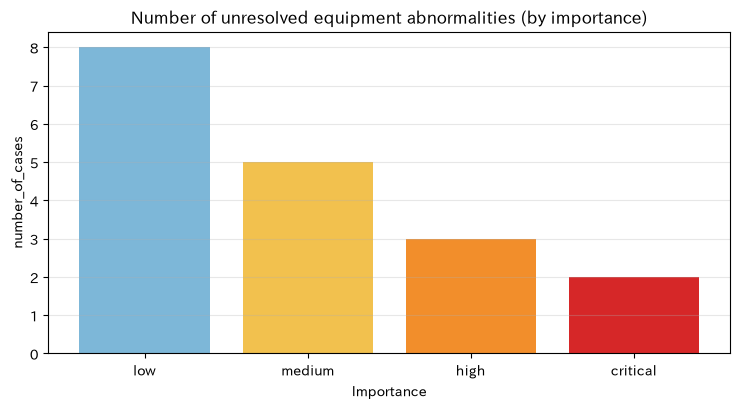
Only projects that meet the query criteria are returned in order of importance, and on-site sites can narrow down their priority targets. The graph allows you to understand the importance composition of unresolved cases. In practice, in addition to limit, pagination such as cursor-based pagination, DB indexing of search columns, and viewing permissions are designed. Zero entries are normal search results and are distinguished from communication errors.
No.033: Creating the POST API
Practical context
POST registers a new equipment incident. In this example, the server assigns an ID and the initial open status; the client supplies the occurrence time in occurred_at. Add a separate server-generated field if reception time must also be recorded. Production systems need an idempotency strategy to prevent duplicate submissions.
Design and validation
The quality of registration is evaluated not only by the “HTTP success rate” but also by the following KPIs.
Return 201 Created on successful creation, distinguishing between input and server-generated items.
Check with Python
class Severity(str, Enum):
    low = "low"
    medium = "medium"
    high = "high"
    critical = "critical"


class IncidentStatus(str, Enum):
    open = "open"
    investigating = "investigating"
    resolved = "resolved"


class IncidentCreate(BaseModel):
    equipment_id: str = Field(pattern=r"^(MC|AS)-\d{3}$", examples=["MC-101"])
    line: str = Field(min_length=2, max_length=20)
    occurred_at: datetime
    severity: Severity
    temperature_c: float = Field(ge=-20, le=200)
    vibration_mm_s: float = Field(ge=0, le=50)
    downtime_minutes: int = Field(default=0, ge=0, le=10_080)
    description: str = Field(min_length=3, max_length=200)


@app.post(
    "/incidents", status_code=status.HTTP_201_CREATED, tags=["equipment malfunction"]
)
def create_incident(payload: IncidentCreate):
    new_id = next(incident_ids)
    row = {"id": new_id, **payload.model_dump(mode="json"), "status": "open"}
    incident_store.append(row)
    return row


new_payload = {
    "equipment_id": "MC-101",
    "line": "processing1",
    "occurred_at": "2026-07-11T09:20:00",
    "severity": "critical",
    "temperature_c": 91.4,
    "vibration_mm_s": 7.2,
    "downtime_minutes": 35,
    "description": "Automatic shutdown due to spindle overheating",
}
post_response = client.post("/incidents", json=new_payload)
print("status_code:", post_response.status_code)
display(pd.DataFrame([post_response.json()]))status_code: 201| id | equipment_id | line | occurred_at | severity | temperature_c | vibration_mm_s | downtime_minutes | description | status | |
|---|---|---|---|---|---|---|---|---|---|---|
| 0 | 1031 | MC-101 | processing1 | 2026-07-11T09:20:00 | critical | 91.40 | 7.20 | 35 | Automatic shutdown due to spindle overheating | open |
Reading the results
201 and numbered IDs, the initial state open are returned, allowing the caller to uniquely reference the reception results. By setting the initial state value on the server side, you can prevent inconsistencies that suddenly resolved upon new registration. In production, we use the DB’s unique constraints and idempotency keys to prevent duplicate IDs or double registrations even when registering simultaneously.
No.034: Updating Data with the PUT API
Practical context
PUT replaces the state of the target resource with the supplied representation. Here, /incidents/{id}/progress represents progress as two required fields: status and downtime. Updating this subresource preserves the incident’s equipment ID and occurrence time. Use PATCH when fields on an incident may be changed independently.
Design and validation
State transitions are not free string changes; for example,
This is a possible finite-state workflow. The sample validates allowed status names but does not enforce this transition order. In practice, you can set conditions that allow reversal, updaters, update times, and versions for optimistic locking. The idempotence, which means that sending PUT multiple times with the same content yields the same result, contributes to safety during communication retransmission.
Check with Python
class IncidentUpdate(BaseModel):
    status: IncidentStatus
    downtime_minutes: int = Field(ge=0, le=10_080)


@app.put("/incidents/{incident_id}/progress", tags=["equipment malfunction"])
def update_incident(incident_id: int, payload: IncidentUpdate):
    for row in incident_store:
        if row["id"] == incident_id:
            row.update(payload.model_dump(mode="json"))
            return row
    raise HTTPException(status_code=404, detail="incident not found")


created_id = post_response.json()["id"]
put_response = client.put(
    f"/incidents/{created_id}/progress",
    json={"status": "investigating", "downtime_minutes": 52},
)
print("status_code:", put_response.status_code)
display(
    pd.DataFrame([put_response.json()])[
        ["id", "equipment_id", "status", "downtime_minutes"]
    ]
)status_code: 200| id | equipment_id | status | downtime_minutes | |
|---|---|---|---|---|
| 0 | 1031 | MC-101 | investigating | 52 |
Reading the results
Only the status of the specified ID and the stop time were updated, while the equipment ID and other details were retained. In practice, we also examine rules between items, such as ‘resolved but no recovery time.’ Also, if multiple people update simultaneously, winning the last write will lose the early update, so conflict detection based on version number or updated_at is necessary.
No.035: Delete Data with the DELETE API
Practical context
DELETE is an operation to undo incorrect registrations or similar issues. However, since equipment abnormalities are records used for audits, quality assurance, and recurrence prevention, physical deletion should not be routinely used. In actual use, logical deletion with a deleted_at and reason for deletion is recommended, or correction history. Here, to clarify HTTP behavior, we physically delete it in memory.
Design and validation
If you don’t return the text on a successful attempt, 204 No Content is the most natural choice; if you want to return the deleted result, 200 OK is the most natural choice. Confirm that retrieval after deletion is 404. By monitoring deletion rates and the time from registration to deletion as KPIs, you can identify issues with input screens and business rules.
Check with Python
@app.delete("/incidents/{incident_id}", tags=["equipment malfunction"])
def delete_incident(incident_id: int):
    for index, row in enumerate(incident_store):
        if row["id"] == incident_id:
            deleted = incident_store.pop(index)
            return {"deleted_id": incident_id, "equipment_id": deleted["equipment_id"]}
    raise HTTPException(status_code=404, detail="incident not found")


delete_response = client.delete(f"/incidents/{created_id}")
delete_again_response = client.delete(f"/incidents/{created_id}")
display(
    pd.DataFrame(
        [
            {
                "operation": "1Deletion of the Episode",
                "status_code": delete_response.status_code,
                "Response": delete_response.json(),
            },
            {
                "operation": "SameIDRedelete",
                "status_code": delete_again_response.status_code,
                "Response": delete_again_response.json(),
            },
        ]
    )
)| operation | status_code | Response | |
|---|---|---|---|
| 0 | 1Deletion of the Episode | 200 | {'deleted_id': 1031, 'equipment_id': 'MC-101'} |
| 1 | SameIDRedelete | 404 | {'detail': 'incident not found'} |
Reading the results
The first time, I was able to identify the deletion target, and the second time, it turned out to be 404. This allows the caller to determine that the item is “deleted or has an incorrect ID.” However, in the actual maintenance records, logical deletion is often chosen simply by recording deletion permissions, reasons, actors, and times in the audit log and excluding them from analysis.
No.036: Verifying Requests with Pydantic
Practical context
Verification prevents incorrect temperatures or equipment IDs from entering the database and being used for false alerts or incorrect equipment shutdown decisions. In addition to the required type, range, and string format, we also check compatibility with the equipment master and the units for each sensor type.
Design and validation
If the number of inputs is and the number of validation errors is , the validation error rate is
By aggregating by item, you can determine which areas of on-site training, UI, and equipment integration need improvement. Pydantic handles structural verification, but referential consistency, such as “whether the equipment actually exists,” requires database verification.
Check with Python
invalid_payloads = [
    {**new_payload, "equipment_id": "machine-1"},
    {**new_payload, "severity": "urgent"},
    {**new_payload, "temperature_c": 480},
    {**new_payload, "downtime_minutes": -5},
]

validation_rows = []
for no, payload in enumerate(invalid_payloads, start=1):
    response = client.post("/incidents", json=payload)
    first_error = response.json()["detail"][0]
    validation_rows.append(
        {
            "case": no,
            "status_code": response.status_code,
            "field": ".".join(map(str, first_error["loc"][1:])),
            "error_type": first_error["type"],
        }
    )

display(pd.DataFrame(validation_rows))| case | status_code | field | error_type | |
|---|---|---|---|---|
| 0 | 1 | 422 | equipment_id | string_pattern_mismatch |
| 1 | 2 | 422 | severity | enum |
| 2 | 3 | 422 | temperature_c | less_than_equal |
| 3 | 4 | 422 | downtime_minutes | greater_than_equal |
Reading the results
All four cases were 422 Unprocessable Content, and the question items and types were returned. The caller can prompt corrections on a per-field basis. If validation limits are too restrictive, legitimate exceptional values may be rejected, so settings are made based on equipment specifications and actual measurements, and out-of-range values are chosen as “Reject,” “Warning Accepted,” or “Isolated.”
No.037: Implementing Error Handling
Practical context
On the API user side, if it cannot be found, it checks the ID; if duplicates, it displays existing cases; if input is incorrect, it corrects the form. Setting everything to 500 leads to double registration due to retransmission and unnecessary maintenance system shutdowns. Error response is the business interface that determines recovery actions.
Design and validation
Divide errors into at least the following layers.
| status | Meaning | Typical Behaviors of the Caller |
|---|---|---|
| 404 | No target | Check ID and deleted status |
| 409 | Conflict with the current state | Reacquire existing data |
| 422 | Violation of input contract | Relevant items corrected |
| 500 | Unexpected internal failure | Notification to operation with record ID attached |
By monitoring the number and ratio of error codes over time, you can distinguish between failures and misuses.
Check with Python
class DuplicateIncidentError(Exception):
    def __init__(self, existing_id: int):
        self.existing_id = existing_id


error_app = FastAPI(title="Equipment Exception ManagementAPI(Example error)")


@error_app.exception_handler(DuplicateIncidentError)
def duplicate_handler(request, exc):
    return JSONResponse(
        status_code=409,
        content={
            "code": "DUPLICATE_INCIDENT",
            "message": "There are cases with the same equipment and occurrence times",
            "existing_id": exc.existing_id,
        },
    )


@error_app.get("/incidents/{incident_id}")
def get_one_with_error(incident_id: int):
    row = next((row for row in incident_store if row["id"] == incident_id), None)
    if row is None:
        raise HTTPException(
            status_code=404, detail={"code": "INCIDENT_NOT_FOUND", "id": incident_id}
        )
    return row


@error_app.post("/duplicates-demo")
def duplicates_demo():
    raise DuplicateIncidentError(existing_id=1001)


error_client = TestClient(error_app)
error_results = [
    {"case": "nonexistentID", "response": error_client.get("/incidents/9999")},
    {
        "case": "duplicate registration",
        "response": error_client.post("/duplicates-demo"),
    },
]
display(
    pd.DataFrame(
        [
            {
                "case": x["case"],
                "status_code": x["response"].status_code,
                "body": x["response"].json(),
            }
            for x in error_results
        ]
    )
)| case | status_code | body | |
|---|---|---|---|
| 0 | nonexistentID | 404 | {'detail': {'code': 'INCIDENT_NOT_FOUND', 'id': 9999}} |
| 1 | duplicate registration | 409 | {'code': 'DUPLICATE_INCIDENT', 'message': 'There are cases with the same equipment and occurrence times', 'existing_id': 1001} |
Reading the results
The non-existent ID was 404, the duplicate was 409, and the machine check code and human message could be returned. In the production 500 response, SQL and stack traces are not sent externally; instead, only the correlation ID is returned and linked to the detailed logs. The duplicate example raises an exception deliberately; the later database example performs detection with a unique constraint. By returning the existing incident ID in a 409 response, callers can be directed to existing cases without double registration.
No.038: Implementing DB Connection Processing
Practical context
The list in memory disappears when the process restarts and cannot be shared across multiple servers. The database is the sole source of record, and connections, SQL, commits, rollbacks, and closures are managed in fixed units. Here, we use SQLite, which does not require an external server.
Design and validation
Transactions consolidate multiple processes into either “All successful” or “All canceled.” In availability design, the relationship between concurrent requests, DB retention time per request, and average arrival rate is observed to adjust the connection pool. This notebook shares one connection and sends test requests sequentially. check_same_thread=False does not make concurrent access safe. In production, manage connections and transaction boundaries per request and use pooling where appropriate for the database.
Bind values through SQL placeholders rather than concatenating them into SQL text.
Check with Python
connection = sqlite3.connect(":memory:", check_same_thread=False)
connection.row_factory = sqlite3.Row
connection.execute("""
CREATE TABLE incidents (
    id INTEGER PRIMARY KEY AUTOINCREMENT,
    equipment_id TEXT NOT NULL,
    line TEXT NOT NULL,
    occurred_at TEXT NOT NULL,
    severity TEXT NOT NULL CHECK (severity IN ('low', 'medium', 'high', 'critical')),
    status TEXT NOT NULL CHECK (status IN ('open', 'investigating', 'resolved')),
    temperature_c REAL NOT NULL,
    vibration_mm_s REAL NOT NULL,
    downtime_minutes INTEGER NOT NULL CHECK (downtime_minutes >= 0),
    description TEXT NOT NULL,
    UNIQUE (equipment_id, occurred_at)
)
""")

insert_sql = """
INSERT INTO incidents
(id, equipment_id, line, occurred_at, severity, status, temperature_c, vibration_mm_s, downtime_minutes, description)
VALUES (:id, :equipment_id, :line, :occurred_at, :severity, :status, :temperature_c, :vibration_mm_s, :downtime_minutes, :description)
"""
with connection:
    connection.executemany(insert_sql, incident_df.to_dict(orient="records"))

db_summary = pd.read_sql_query(
    """
SELECT line, COUNT(*) AS incident_count,
       SUM(downtime_minutes) AS total_downtime_minutes,
       ROUND(AVG(temperature_c), 1) AS avg_temperature_c
FROM incidents
GROUP BY line
ORDER BY total_downtime_minutes DESC
""",
    connection,
)
display(db_summary)

plt.figure(figsize=(7.5, 4.2))
plt.bar(db_summary["line"], db_summary["total_downtime_minutes"], color="#4e79a7")
plt.title("Equipment downtime by line (SQLite aggregation)")
plt.xlabel("Line")
plt.ylabel("Total stop time (minutes)")
plt.grid(axis="y", alpha=0.3)
plt.tight_layout()
plt.show()| line | incident_count | total_downtime_minutes | avg_temperature_c | |
|---|---|---|---|---|
| 0 | Assembly1 | 12 | 629 | 67.90 |
| 1 | processing1 | 11 | 388 | 70.30 |
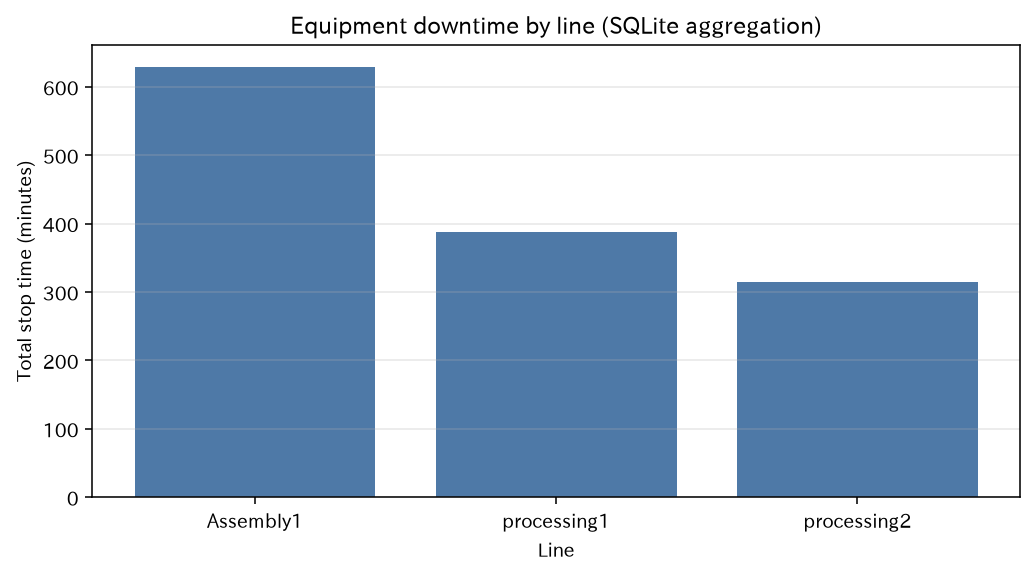
| 2 | processing2 | 7 | 315 | 64.00 |
Reading the results
We registered 30 cases in SQLite and were able to aggregate the number of cases, downtime times, and average temperature by line using SQL. By viewing the same database with the API, you can reduce misalignment between the screen and the analysis. During the production migration, we not only select database products but also design migration, backup and recovery goals, connection limits, timeouts, slow queries, and encryption of personal and confidential information.
No.039: Exposing CRUD operations through an API
Practical context
CRUD stands for Create, Read, Update, and Delete. By integrating all four operations into the same database and data contract, you can check registered cases in a list and details, update progress, and cancel erroneous registrations in a consistent workflow. The important thing is not to create four functions, but to align constraints and transactions across all operations.
Design and validation
CRUD API acceptance tests are structured as state transitions, not isolated points.
By automating this chain, you can check whether business scenarios are broken even after DB changes. It is also important to check the number of SQL rows and not report success when an update or deletion has no matching target.
Check with Python
db_app = FastAPI(
    title="Equipment Exception ManagementAPI",
    version="1.0.0",
    description="Managing abnormal acceptance and maintenance progress for manufacturing equipmentAPI",
)


class IncidentOut(IncidentCreate):
    model_config = ConfigDict(from_attributes=True)
    id: int
    status: IncidentStatus


def fetch_one(incident_id: int):
    row = connection.execute(
        "SELECT * FROM incidents WHERE id = ?", (incident_id,)
    ).fetchone()
    if row is None:
        raise HTTPException(status_code=404, detail="incident not found")
    return dict(row)


@db_app.post(
    "/incidents",
    response_model=IncidentOut,
    status_code=201,
    tags=["equipment malfunctionCRUD"],
)
def db_create(payload: IncidentCreate):
    try:
        with connection:
            cursor = connection.execute(
                """
                INSERT INTO incidents
                (equipment_id, line, occurred_at, severity, status, temperature_c, vibration_mm_s, downtime_minutes, description)
                VALUES (?, ?, ?, ?, 'open', ?, ?, ?, ?)
            """,
                (
                    payload.equipment_id,
                    payload.line,
                    payload.occurred_at.isoformat(),
                    payload.severity.value,
                    payload.temperature_c,
                    payload.vibration_mm_s,
                    payload.downtime_minutes,
                    payload.description,
                ),
            )
    except sqlite3.IntegrityError as exc:
        raise HTTPException(
            status_code=409, detail="duplicate or constraint violation"
        ) from exc
    return fetch_one(cursor.lastrowid)


@db_app.get(
    "/incidents", response_model=list[IncidentOut], tags=["equipment malfunctionCRUD"]
)
def db_list(limit: int = Query(20, ge=1, le=100)):
    rows = connection.execute(
        "SELECT * FROM incidents ORDER BY occurred_at DESC LIMIT ?", (limit,)
    ).fetchall()
    return [dict(row) for row in rows]


@db_app.get(
    "/incidents/{incident_id}",
    response_model=IncidentOut,
    tags=["equipment malfunctionCRUD"],
)
def db_get(incident_id: int):
    return fetch_one(incident_id)


@db_app.put(
    "/incidents/{incident_id}/progress",
    response_model=IncidentOut,
    tags=["equipment malfunctionCRUD"],
)
def db_update(incident_id: int, payload: IncidentUpdate):
    fetch_one(incident_id)
    with connection:
        connection.execute(
            "UPDATE incidents SET status = ?, downtime_minutes = ? WHERE id = ?",
            (payload.status.value, payload.downtime_minutes, incident_id),
        )
    return fetch_one(incident_id)


@db_app.delete(
    "/incidents/{incident_id}", status_code=204, tags=["equipment malfunctionCRUD"]
)
def db_delete(incident_id: int):
    fetch_one(incident_id)
    with connection:
        connection.execute("DELETE FROM incidents WHERE id = ?", (incident_id,))
    return None


db_client = TestClient(db_app)
crud_steps = []

r_create = db_client.post(
    "/incidents", json={**new_payload, "occurred_at": "2026-07-11T10:00:00"}
)
crud_id = r_create.json()["id"]
crud_steps.append(("Create", r_create.status_code, r_create.json()["status"]))
r_read = db_client.get(f"/incidents/{crud_id}")
crud_steps.append(("Read", r_read.status_code, r_read.json()["status"]))
r_update = db_client.put(
    f"/incidents/{crud_id}/progress",
    json={"status": "resolved", "downtime_minutes": 74},
)
crud_steps.append(("Update", r_update.status_code, r_update.json()["status"]))
r_delete = db_client.delete(f"/incidents/{crud_id}")
crud_steps.append(("Delete", r_delete.status_code, "deleted"))
r_after = db_client.get(f"/incidents/{crud_id}")
crud_steps.append(("Read after Delete", r_after.status_code, "not found"))

display(pd.DataFrame(crud_steps, columns=["step", "status_code", "result"]))
print(
    "DBNumber of Remaining Entries:",
    connection.execute("SELECT COUNT(*) FROM incidents").fetchone()[0],
)| step | status_code | result | |
|---|---|---|---|
| 0 | Create | 201 | open |
| 1 | Read | 200 | open |
| 2 | Update | 200 | resolved |
| 3 | Delete | 204 | deleted |
| 4 | Read after Delete | 404 | not found |
DBNumber of Remaining Entries: 30Reading the results
I was able to confirm the series of contracts: create 201, acquire 200, update 200, delete 204, and retrieve 404 after deletion. The number of database entries has also returned to the original 30, and deletions are reflected in the persistence layer. In practice, this scenario is automated for testing, adding authentication and permissions, audit logs, logical deletions, simultaneous updates, and database rollbacks.
No.040: Checking API Specifications in Swagger UI
Practical context
FastAPI generates OpenAPI specifications from code and provides the Swagger UI for /docs by default. Screen developers, equipment integration staff, and testers can check URLs, HTTP methods, input examples, response types, and errors under the same specifications. Reduce reliance on verbal explanations and outdated spreadsheet specifications.
Design and validation
Specifications are not static deliverables at the time of creation but contracts synchronized with code. However, automatic generation only accurately indicates the “written type” and does not fully compensate for the intended purpose of the work. summary, description, examples, tags, and response models are established, and OpenAPI differences are examined with CI.
The comprehensiveness of specifications can be checked by differences between implementation and documentation routes, response model setup rates, and the presence or absence of error examples.
Check with Python
docs_response = db_client.get("/docs")
openapi_response = db_client.get("/openapi.json")
schema = openapi_response.json()

endpoint_rows = []
for path, operations in schema["paths"].items():
    for method, spec in operations.items():
        endpoint_rows.append(
            {
                "method": method.upper(),
                "path": path,
                "summary": spec.get("summary", ""),
                "response_codes": ", ".join(spec.get("responses", {}).keys()),
            }
        )
endpoint_table = pd.DataFrame(endpoint_rows).sort_values(["path", "method"])

print("Swagger UI:", docs_response.status_code, docs_response.headers["content-type"])
print("OpenAPI   :", openapi_response.status_code, schema["info"])
display(endpoint_table)

method_counts = (
    endpoint_table["method"]
    .value_counts()
    .reindex(["GET", "POST", "PUT", "DELETE"], fill_value=0)
)
plt.figure(figsize=(7.5, 4.2))
plt.bar(method_counts.index, method_counts.values, color="#59a14f")
plt.title("Number of endpoints in the OpenAPI specification")
plt.xlabel("HTTP method")
plt.ylabel("Number of endpoints")
plt.grid(axis="y", alpha=0.3)
plt.tight_layout()
plt.show()Swagger UI: 200 text/html; charset=utf-8
OpenAPI : 200 {'title': 'Equipment Exception ManagementAPI', 'description': 'Managing abnormal acceptance and maintenance progress for manufacturing equipmentAPI', 'version': '1.0.0'}| method | path | summary | response_codes | |
|---|---|---|---|---|
| 1 | GET | /incidents | Db List | 200, 422 |
| 0 | POST | /incidents | Db Create | 201, 422 |
| 3 | DELETE | /incidents/{incident_id} | Db Delete | 204, 422 |
| 2 | GET | /incidents/{incident_id} | Db Get | 200, 422 |
| 4 | PUT | /incidents/{incident_id}/progress | Db Update | 200, 422 |
Reading the results
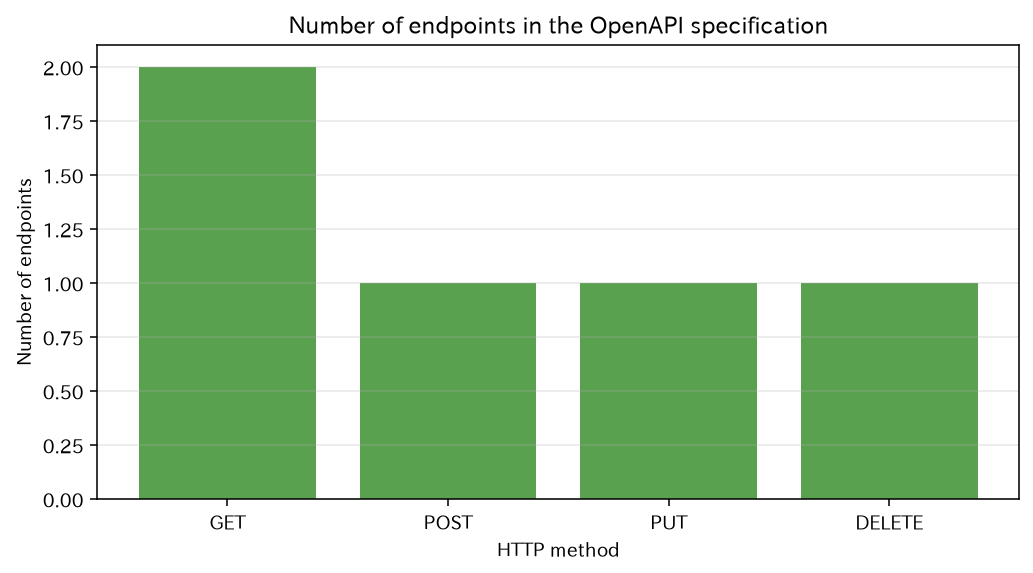
/docs and /openapi.json can be obtained at 200, and GET, POST, PUT, and DELETE have been included in the specification. In the Swagger UI, you can check each input model and try them on the spot. In production, the external exposure scope of the Swagger UI is controlled so that unlimited attempts to APIs requiring authentication are not allowed. Additionally, anticipated 409 cases and audit requirements for business operations are clearly indicated in the explanatory text and response definitions.
Design and operational considerations
What is important throughout these ten is that APIs should be designed not as screen accessories but as standard operations for handling equipment abnormalities.
- Data contracts determine analysis quality: Unifying equipment ID, importance, status, and units at the entry point stabilizes aggregation and forecasting of subsequent processes.
- HTTP status determines recovery actions: By separating 404, 409, 422, and 500, you can automate modification, re-retrieval, and operational notifications.
- Database constraints provide a final consistency check: Not only API validation, but also unique and CHECK constraints prevent inconsistencies during concurrent execution.
- CRUD is tested as a state transition: Verification is conducted using business scenarios from registration to deletion confirmation, rather than operating one by one
- Synchronize specifications with code: Making OpenAPI a common contract to reduce differences in perception between screens, integration, and testing
- Deletion is decided based on how business records are handled: Even if technically DELETED, logical deletion is often chosen for quality and audit requirements.
Rather than building a large-scale foundation from scratch, it is realistic to digitize a single critical task into a small API and measure improvements in data quality and dwell times.
Preparing for production
When moving the Notebook example into production, at least add the following:
- Business Requirements: Define registrants, response officers, status transitions, SLAs, deletions/corrections, and notification conditions
- Master Data Design: Normalize equipment, lines, bases, causes, procedures, and components, and unify code systems and units.
- Authentication and authorization: Control viewing, registration, status updates, deletion, and management operations by role.
- Database operations: Plan schema migrations, backups, restore tests, and connection management for the selected database
- Concurrency and idempotency: Design resend keys, unique DB constraints, optimistic locks, and transaction boundaries
- observability: Set structured logs, correlation IDs, metrics, traces, alerts, and personal information masking
- Quality Assurance: Run standalone, API, database integration, load, security, and business acceptance tests with CI
- KPI: Continuously evaluate the time from reception to initiation and recovery, unresolved backlogs, duplicate rate, 422 rate, and downtime
Setting who wants to make which decisions and how many minutes faster before technology selection clarifies the required APIs and data granularity.
Conclusion
In this article, we used fictional equipment anomaly data to implement everything in a single flow—from the minimum configuration of FastAPI, GET, POST, PUT, DELETE, Pydantic verification, error design, SQLite connection, CRUD integration, to the Swagger UI.
The value of API development is not in increasing endpoints. It is about standardizing input, updating business status without contradictions, clarifying recovery actions during abnormalities, and enabling both the field and management to make decisions based on the same data. Start with operations with significant downtime and clear information distribution, then expand while checking KPIs and operational load.
Business inquiries
At Surikobo, we support business organization for manufacturing, API and database design, backend development using FastAPI, integration with existing spreadsheets and equipment data, testing and operations design, and Python training.
From stages such as “wanting to centralize equipment abnormalities and maintenance requests,” “simplifying paper-based and Excel-based tasks,” or “designing APIs and data analysis platforms as an integrated unit,” you can consult with us considering operational constraints on site.
📩 Contact Us: www.surikobo.co.jp/contact
Contact us to discuss your requirements.