
100 Exercises / System Development / 100 Exercise on System Development
Introduction to Certification and Authorization Management in Manufacturing | 10 Steps to Learn JWT, RBAC, and API Protection
Protecting Factory Operations Systems by Protecting ‘Who Can Do What’ — 10 Exercises on Authentication and Permission Management
Focusing on Work Performance and Quality Record System for manufacturing sites, we will provide a comprehensive overview of authentication and authorization, login, password protection, JWT, frontend login status, logout, role design, screen control, and API protection. The purpose is not to add a login function. While maintaining operator operability, it is about restricting important operations such as changing quality judgments and updating the master system to the appropriate personnel, thereby creating an auditable business foundation.
[!NOTE] This material is a notebook previously used by Surikoubo (or personally by the representative, Kazuyama), and has been reconstructed, edited, and published with the company’s permission.
All data listed is fictional and has no relation whatsoever to real companies, factories, or figures.
Introduction: Practical Challenges in Manufacturing Covered in This Article
In manufacturing systems, the same screen may be used by workers, team leaders, quality assurance personnel, and system administrators. However, the information you can view and the actions you can perform vary by role. For example, even if workers can register their own line’s performance, they must not be able to change confirmed quality judgments or user permissions.
The challenge this time is to simultaneously establish the following three points for the factory’s work performance and quality record system.
- Identity verification: Confirm that the person operating the operation is a registered person
- least privilege: Allow only the necessary operations according to your job, line of affiliation, and target data
- Business Continuity: Shared devices, shift work, and ensuring safe use even with communication delays
From here on, we generate hypothetical users, login attempts, API access, and sessions in Python, and check design decisions using tables and graphs.
Common situations on site
- On a shared device within the factory, the previous user’s login status remains, and achievements are registered as a different person.
- The design allows anyone to log in to use all functions, allowing anyone to change quality judgments and master settings
- Passwords are stored only in plain text or as fast hashes, increasing the risk of leaks.
- The admin button is hidden on the screen, but you can operate it directly by calling the API.
- Only the JWT signature is checked, without checking the expiration date, issuer, or intended use.
- Even after retirement, transfer, or support work, old authority and sessions remain
- Authentication failures are collectively recorded as “errors,” making it impossible to distinguish between attacks, operational errors, and account suspensions.
Why is this issue so difficult to judge?
Authentication and privilege management are not a one-axis issue where strengthening security is always better. Short automatic logouts reduce impersonation while increasing the burden of repeatedly logging in after removing gloves. The more detailed the authority, the closer it approaches the minimum privileges, but transfers and maintenance for support shifts become more complex.
Furthermore, it is necessary to consider the following layers separately.
- Identity verification: Verify identity with passwords and multi-factor authentication
- Session Management: Carry over the status of ‘Confirmed Completed’ for a limited time
- Approval: Each time, it is determined whether the person is allowed to operate on the target data.
- Audit: Track who, when, what, and who was allowed or denied
You need to design screen usability, API security, HR and organizational information updates, and audit logs all in one, tracking not only success rates but also reasons for rejection and deviation rates as KPIs.
Overview of Exercise covered this time
| No. | Theme | Key Points to Check in the Factory Operations System |
|---|---|---|
| 051 | Certification and Authorization | Separating identity verification from permission to operate |
| 052 | Login screen | Balancing safety and on-site completion rates |
| 053 | Password | Avoid storing plain text and use slow hashes with salt |
| 054 | How JWT Works | Understanding the structure and validation items of signed tokens |
| 055 | Login API | Turn authentication results into consistent API responses |
| 056 | Front Condition Management | Clearly indicate unconfirmed, confirmed, or authenticated |
| 057 | Logout | Designing device-side deletion and server-side expiration |
| 058 | Roll separation | Separating operations for administrators and general users |
| 059 | screen switch | Present only paths that match your authority |
| 060 | API Protection | Authenticate and authorize all protected APIs |
Preparing the Python environment
Generate and aggregate fictional data using numpy and pandas, and visualize it in matplotlib. For JWT structure verification and password hashing examples, use the Python standard library. Keep the random number seed fixed, and make sure the aggregate result does not change even if you rerun.
%matplotlib inline
%config InlineBackend.figure_format = 'svg'

import sys
import json
import base64
import hashlib
import hmac
from datetime import datetime, timezone

import numpy as np
import pandas as pd
import matplotlib
import matplotlib.pyplot as plt
import japanize_matplotlib

SEED = 6051
rng = np.random.default_rng(SEED)
pd.set_option("display.max_columns", 30)
pd.set_option("display.width", 140)

print(f"Python     : {sys.version.split()[0]}")
print(f"numpy      : {np.__version__}")
print(f"pandas     : {pd.__version__}")
print(f"matplotlib : {matplotlib.__version__}")
print(f"random seed: {SEED}")
Python : 3.13.1
numpy : 2.5.1
pandas : 3.0.3
matplotlib : 3.11.0
random seed: 6051Creation of Fictional Data
Create 120 users working on three lines, 1,500 login attempts, 2,400 API accesses, and 180 active sessions. Users are assigned roles such as worker, team leader, quality assurance, and administrator.
Logs intentionally include incorrect passwords, incomplete MFA, suspended accounts, expired tokens, invalid signatures, incomplete roles, and off-line access. This is not a real certification log, but fictitious data for design review and KPI calculations.
roles = ["worker", "squad leader", "Quality Assurance", "administrator"]
role_prob = [0.63, 0.20, 0.12, 0.05]
n_users = 120

users = pd.DataFrame({
    "user_id": [f"U{i:03d}" for i in range(1, n_users + 1)],
    "role": rng.choice(roles, n_users, p=role_prob),
    "home_line": rng.choice(["No.1Line", "No.2Line", "No.3Line"], n_users),
    "account_status": rng.choice(["active", "locked", "disabled"], n_users, p=[0.92, 0.05, 0.03]),
    "mfa_required": rng.random(n_users) < 0.28,
})

n_login = 1500
login_attempts = pd.DataFrame({
    "attempt_id": [f"L{i:05d}" for i in range(1, n_login + 1)],
    "attempted_at": pd.Timestamp("2026-06-01") + pd.to_timedelta(rng.integers(0, 30 * 24 * 60, n_login), unit="m"),
    "user_id": rng.choice(users["user_id"], n_login),
    "device": rng.choice(["Shared tablet", "OfficePC", "Handy device"], n_login, p=[0.52, 0.28, 0.20]),
    "password_ok": rng.random(n_login) < 0.94,
    "mfa_completed": rng.random(n_login) < 0.965,
    "duration_sec": np.maximum(3, rng.lognormal(mean=2.9, sigma=0.48, size=n_login)).round(1),
})
login_attempts = login_attempts.merge(users[["user_id", "account_status", "mfa_required"]], on="user_id", how="left")
login_attempts["failure_reason"] = np.select(
    [
        login_attempts["account_status"].eq("disabled"),
        login_attempts["account_status"].eq("locked"),
        ~login_attempts["password_ok"],
        login_attempts["mfa_required"] & ~login_attempts["mfa_completed"],
    ],
    ["Suspended Account", "On lock", "Password mismatch", "MFAincomplete"],
    default="Success",
)
login_attempts["success"] = login_attempts["failure_reason"].eq("Success")

endpoint_rules = pd.DataFrame({
    "endpoint": ["GET /work-orders", "POST /results", "PUT /quality-judgments", "GET /audit-logs", "POST /users"],
    "required_role": ["Worker or above", "Worker or above", "Quality Assurance and More", "administrator", "administrator"],
    "allowed_roles": [
        roles,
        roles,
        ["Quality Assurance", "administrator"],
        ["administrator"],
        ["administrator"],
    ],
})
n_access = 2400
api_access = pd.DataFrame({
    "request_id": [f"R{i:05d}" for i in range(1, n_access + 1)],
    "user_id": rng.choice(users["user_id"], n_access),
    "endpoint": rng.choice(endpoint_rules["endpoint"], n_access, p=[0.38, 0.31, 0.15, 0.09, 0.07]),
    "target_line": rng.choice(["No.1Line", "No.2Line", "No.3Line"], n_access),
    "token_present": rng.random(n_access) < 0.975,
    "signature_valid": rng.random(n_access) < 0.992,
    "token_expired": rng.random(n_access) < 0.035,
})
api_access = (api_access
    .merge(users[["user_id", "role", "home_line", "account_status"]], on="user_id", how="left")
    .merge(endpoint_rules[["endpoint", "allowed_roles"]], on="endpoint", how="left"))
api_access["identity_verified"] = (
    api_access["token_present"] & api_access["signature_valid"] & ~api_access["token_expired"] & api_access["account_status"].eq("active")
)
api_access["role_allowed"] = api_access.apply(lambda r: r["role"] in r["allowed_roles"], axis=1)
api_access["scope_allowed"] = api_access["role"].isin(["Quality Assurance", "administrator"]) | api_access["home_line"].eq(api_access["target_line"])
api_access["permission_granted"] = api_access["identity_verified"] & api_access["role_allowed"] & api_access["scope_allowed"]

n_sessions = 180
sessions = pd.DataFrame({
    "session_id": [f"S{i:04d}" for i in range(1, n_sessions + 1)],
    "user_id": rng.choice(users["user_id"], n_sessions),
    "device": rng.choice(["Shared tablet", "OfficePC", "Handy device"], n_sessions, p=[0.55, 0.27, 0.18]),
    "age_min": rng.integers(1, 721, n_sessions),
    "revoked": rng.random(n_sessions) < 0.08,
})

display(users.head())
print(f"user: {len(users):,}name / Login attempt: {len(login_attempts):,}records / APIAccess: {len(api_access):,}records / Session: {len(sessions):,}records")| user_id | role | home_line | account_status | mfa_required | |
|---|---|---|---|---|---|
| 0 | U001 | worker | No.1Line | active | False |
| 1 | U002 | worker | No.3Line | locked | False |
| 2 | U003 | squad leader | No.3Line | active | True |
| 3 | U004 | worker | No.2Line | active | True |
| 4 | U005 | worker | No.2Line | active | False |
Users: 120 / Login attempts: 1,500 / API access: 2,400 / Sessions: 180No.051: Understanding the Difference Between Certification and Authorization
Meaning in Practice
Authentication (Authentication) is about confirming “who the person is,” and Authorization (Authorization) is about “what that person is allowed to do.” Even logged-in workers may not be allowed to finalize quality judgments or add users. At the factory, approval is required to include the assigned line and the target equipment.
Approach to Analysis and Modeling
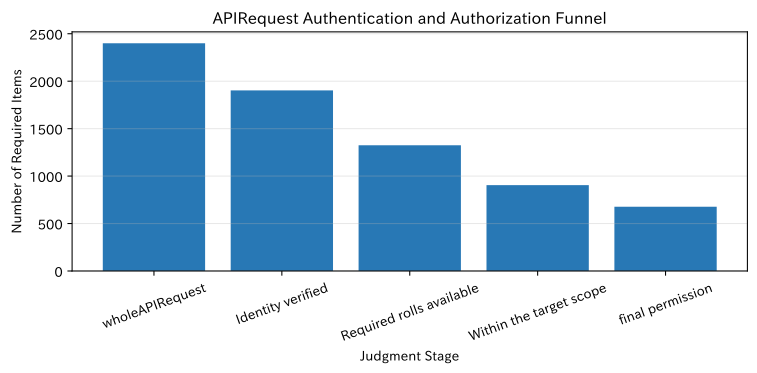
The permission determination for API request is expressed by the following logical product.
indicates identity verification, indicates holding the required role, and indicates the target line or other scope. If even one of these is false, we will reject them and record the reason in the audit log.
Check with Python
auth_funnel = pd.DataFrame({
    "Judgment Stage": ["wholeAPIRequest", "Identity verified", "Required rolls available", "Within the target scope", "final permission"],
    "number_of_cases": [
        len(api_access),
        int(api_access["identity_verified"].sum()),
        int((api_access["identity_verified"] & api_access["role_allowed"]).sum()),
        int((api_access["identity_verified"] & api_access["scope_allowed"]).sum()),
        int(api_access["permission_granted"].sum()),
    ],
})
auth_funnel["full_requirement_ratio_%"] = (auth_funnel["number_of_cases"] / len(api_access) * 100).round(1)
display(auth_funnel)

fig, ax = plt.subplots(figsize=(8, 4))
ax.bar(auth_funnel["Judgment Stage"], auth_funnel["number_of_cases"], color="#2878B5")
ax.set_title("APIRequest Authentication and Authorization Funnel")
ax.set_xlabel("Judgment Stage")
ax.set_ylabel("Number of Required Items")
ax.grid(axis="y", alpha=0.3)
plt.xticks(rotation=20)
plt.tight_layout()
plt.show()| Judgment Stage | number_of_cases | full_requirement_ratio_% | |
|---|---|---|---|
| 0 | wholeAPIRequest | 2400 | 100.0 |
| 1 | Identity verified | 1903 | 79.3 |
| 2 | Required rolls available | 1325 | 55.2 |
| 3 | Within the target scope | 905 | 37.7 |
| 4 | final permission | 677 | 28.2 |
Reading the results
Even after passing identity verification, there are requests that are rejected due to role or area of responsibility assessment. This is not a failure but the result of minimal privilege working. In practice, we do not focus solely on improving success rates; instead, we separate “failed identity verification,” “insufficient roles,” and “outside of responsibility,” and check whether legitimate tasks are excessively rejected.
No.052: Creating a Login Screen
Meaning in Practice
The login screen serves as both the entry point for identity verification and the entry point to start on-site work. On shared devices, security measures such as not leaving candidate user IDs, not displaying passwords on screens or logs, and controlling repeated failures are necessary. On the other hand, we also check whether the burden of MFA or re-entry does not delay the start of work during rotations.
Approach to Analysis and Modeling
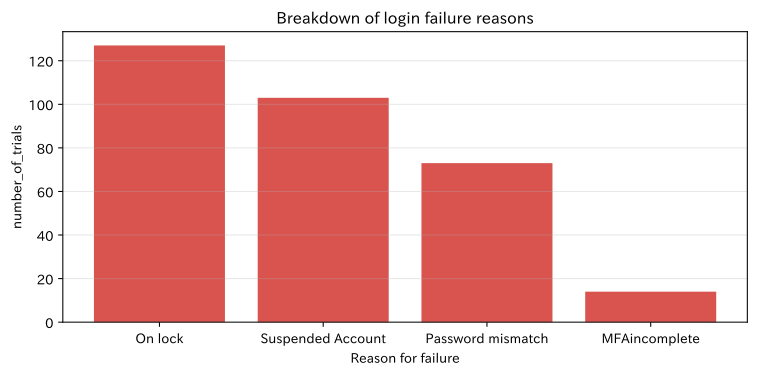
By device, login success rate, median completion time, 95th percentile, and failure reasons are measured. Since the average value alone overlooks the issue of some users stopping for long periods, we use the hem side indicators together.
Check with Python
login_kpi = (login_attempts.groupby("device")
    .agg(
        number_of_trials=("attempt_id", "size"),
        success_rate_pct=("success", lambda s: s.mean() * 100),
        center_finishes_seconds=("duration_sec", "median"),
        p95_is_finished_instant=("duration_sec", lambda s: s.quantile(0.95)),
    )
    .round(1))
failure_counts = login_attempts.loc[~login_attempts["success"], "failure_reason"].value_counts()
display(login_kpi)
display(failure_counts.rename("number_of_cases").to_frame())

fig, ax = plt.subplots(figsize=(8, 4))
ax.bar(failure_counts.index, failure_counts.values, color="#D9534F")
ax.set_title("Breakdown of login failure reasons")
ax.set_xlabel("Reason for failure")
ax.set_ylabel("number_of_trials")
ax.grid(axis="y", alpha=0.3)
plt.tight_layout()
plt.show()| number_of_trials | success_rate_pct | center_finishes_seconds | p95Finished seconds | |
|---|---|---|---|---|
| device | ||||
| Handy device | 313 | 76.7 | 18.1 | 40.0 |
| OfficePC | 411 | 79.3 | 18.4 | 39.2 |
| Shared tablet | 776 | 79.5 | 18.1 | 41.5 |
| number_of_cases | |
|---|---|
| failure_reason | |
| On lock | 127 |
| Suspended Account | 103 |
| Password mismatch | 73 |
| MFAincomplete | 14 |
Reading the results
By breaking down the reasons for failure, you can distinguish between issues that should be improved with password input support and those that require account verification by administrators. It is effective to return standard messages on the screen that prevent attackers from guessing the registration status, while leaving detailed reasons in the server-side audit logs. If the device-specific p95 is long, review including device placement and MFA methods.
No.053: Handling Passwords Securely
Meaning in Practice
Passwords are not saved in a way that can be recovered. To prevent users with the same password from being identified collectively in the event of a leak, a dedicated hash system is used to add salt for each user and slow down the brute-force process. It is also important to protect communications with TLS and not leave passwords on app logs, analytics platforms, or inquiry forms.
Approach to Analysis and Modeling
In this notebook, the standard library PBKDF2 will be used to explain the mechanism. In actual systems, implementations such as Argon2id, scrypt, bcrypt, PBKDF2, etc., provided by the organization’s standards and usage frameworks are selected, and the number of iterations and other factors are regularly reviewed. SALT is not confidential information, but it is unique to each user.
Check with Python
def pbkdf2_hash(password: str, salt: bytes, iterations: int = 210_000) -> str:
    digest = hashlib.pbkdf2_hmac("sha256", password.encode("utf-8"), salt, iterations)
    return base64.b64encode(digest).decode("ascii")

sample_password = "TrainingOnly-Example!"
password_demo = pd.DataFrame([
    {"user": "U001", "salt": "factory-salt-001", "hashLead": pbkdf2_hash(sample_password, b"factory-salt-001")[:20]},
    {"user": "U002", "salt": "factory-salt-002", "hashLead": pbkdf2_hash(sample_password, b"factory-salt-002")[:20]},
])
password_demo["Same password"] = True
display(password_demo)
print("Even with the same passwordsaltBecause of these differences, the saved hashes do not match.")| user | salt | hashLead | Same password | |
|---|---|---|---|---|
| 0 | U001 | factory-salt-001 | qfsoyzYFWurabZUVwCRL | True |
| 1 | U002 | factory-salt-002 | h7aDP+vuWGCBCrLNvu+1 | True |
Even with the same password, the salt values differ, so the stored hashes do not match.Reading the results
Even with the same password, the hash value will change if the salt is different. During verification, the input values are hashed with the same settings as the saved salt, and constant-time comparisons are performed. The number of sample iterations is not set as the production standard, but is determined based on the performance of the running environment, adoption methods, and the latest internal standards. When resetting your password, you need to verify your identity, revoke existing sessions, and record audits.
No.054: Understanding How JWT Authentication Works
Meaning in Practice
JWT is used as a signed token for the API to transfer user information. A typical JWT consists of three parts of the header.payload.signature, and the payload is not encrypted but is represented by a Base64 URL. Therefore, personal or confidential information must not be casually disclosed.
Approach to Analysis and Modeling
APIs verify not only signatures but also token IDjti iss issuer, recipient, aud, and token exp at least the expiration date. Even if JWT is enabled, separate authorization for the target operation is required. It also separates the roles of short-access tokens and update tokens, which are managed more strictly.
Check with Python
def b64url(data: bytes) -> str:
    return base64.urlsafe_b64encode(data).rstrip(b"=").decode("ascii")

header = {"alg": "HS256", "typ": "JWT"}
payload = {
    "sub": "U042", "role": "squad leader", "iss": "factory-auth",
    "aud": "work-api", "iat": 1782860400, "exp": 1782861300, "jti": "demo-jti-001"
}
secret = b"not-for-production-demo-secret"
unsigned = f"{b64url(json.dumps(header, separators=(',', ':')).encode())}.{b64url(json.dumps(payload, ensure_ascii=False, separators=(',', ':')).encode())}"
signature = b64url(hmac.new(secret, unsigned.encode(), hashlib.sha256).digest())
token = f"{unsigned}.{signature}"

parts = pd.DataFrame({
    "part": ["header", "payload", "signature"],
    "Character count": [len(x) for x in token.split(".")],
    "Role": ["Method and Type", "Regarding users and expiration dates,claims", "Tamper detection"],
})
display(parts)
print("JWTExample (at the beginning80Text):", token[:80] + "...")
print("payload:", payload)| part | Character count | Role | |
|---|---|---|---|
| 0 | header | 36 | Method and Type |
| 1 | payload | 164 | Regarding users and expiration dates,claims |
| 2 | signature | 43 | Tamper detection |
JWT example (first 80 characters): eyJhbGciOiJIUzI1NiIsInR5cCI6IkpXVCJ9.eyJzdWIiOiJVMDQyIiwicm9sZSI6IuePremVtyIsIml...
payload: {'sub': 'U042', 'role': 'Class Leader', 'iss': 'factory-auth', 'aud': 'work-api', 'iat': 1782860400, 'exp': 1782861300, 'jti': 'demo-jti-001'}
Reading the results
Since the contents of the payload can be read without a decryption key, JWT is not a “secret container.” Signatures detect tampering but do not automatically prevent the misuse of stolen valid tokens. Combine TLS, short expiration dates, secure storage locations, key rotation, and expiration management as needed. The algorithm does not rely solely on the received token; instead, the server-side fixes the permission method.
No.055: Creating a Login API Using JWT
Meaning in Practice
The login API verifies credentials and issues tokens only on successful occasions. If you externally separate inconsistent passwords and unregistered users externally on a failed mission, it may be used for account enumeration. Separate the amount of information from external responses and internal audit logs.
Approach to Analysis and Modeling
State transitions include “Input Validation → Rate Limit → Credential Verification → Account Status Verification → MFA → Token Issuance.” Measure failure rates at each stage and maintain consistent information on HTTP status, error codes, and audit events. Avoid cramming excessive permission information into the token body and design delays in reflecting changes.
Check with Python
def mock_login_api(user_exists: bool, password_ok: bool, account_status: str, mfa_ok: bool) -> dict:
    if not user_exists or not password_ok:
        return {"status": 401, "public_code": "INVALID_CREDENTIALS", "token_issued": False}
    if account_status != "active":
        return {"status": 403, "public_code": "ACCOUNT_UNAVAILABLE", "token_issued": False}
    if not mfa_ok:
        return {"status": 401, "public_code": "MFA_REQUIRED", "token_issued": False}
    return {"status": 200, "public_code": "OK", "token_issued": True}

login_api_cases = pd.DataFrame([
    {"Case": "normal", **mock_login_api(True, True, "active", True)},
    {"Case": "Password mismatch", **mock_login_api(True, False, "active", True)},
    {"Case": "UnregisteredID", **mock_login_api(False, False, "active", True)},
    {"Case": "Suspended Account", **mock_login_api(True, True, "disabled", True)},
    {"Case": "MFAincomplete", **mock_login_api(True, True, "active", False)},
])
display(login_api_cases)| Case | status | public_code | token_issued | |
|---|---|---|---|---|
| 0 | normal | 200 | OK | True |
| 1 | Password mismatch | 401 | INVALID_CREDENTIALS | False |
| 2 | UnregisteredID | 401 | INVALID_CREDENTIALS | False |
| 3 | Suspended Account | 403 | ACCOUNT_UNAVAILABLE | False |
| 4 | MFAincomplete | 401 | MFA_REQUIRED | False |
Reading the results
If you use the same external code for unregistered IDs and inconsistent passwords, it becomes harder for users to guess whether they have registered. Meanwhile, to enable operations staff to investigate the cause, internal records include correlation ID, time, device, and determination stage. Methods such as returning tokens to the response body or using cookies with Secure, HttpOnly, or SameSite attributes should be chosen according to your browser configuration and threat model.
No.056: Managing Login Status on the Frontend
Meaning in Practice
The frontend distinguishes not only simple loggedIn=True/False but also during initial verification, authentication, expired, renewal, and authentication failure. This is to avoid accidental actions such as briefly displaying the admin screen during initial checks or leaving expired user information behind it.
Approach to Analysis and Modeling
Treat the certified state as a finite state machine. Define the allowed transitions for events, associating screen display, side effects, and the next operation. Do not confuse the token itself with the display state; limit storage location and update processing.
Check with Python
transitions = {
    ("unconfirmed", "App launch"): "confirming",
    ("confirming", "Session Valid"): "Authenticated",
    ("confirming", "No sessions"): "Uncertified",
    ("Authenticated", "Deadline approaching"): "updating",
    ("updating", "Update successful"): "Authenticated",
    ("updating", "Update failure"): "expired",
    ("Authenticated", "Logout"): "Uncertified",
}
events = ["App launch", "Session Valid", "Deadline approaching", "Update successful", "Deadline approaching", "Update failure"]
state = "unconfirmed"
state_log = []
for event in events:
    next_state = transitions.get((state, event), "improper migration")
    state_log.append({"Current Status": state, "Events": event, "Next state": next_state})
    state = next_state

state_log = pd.DataFrame(state_log)
display(state_log)| Current Status | Events | Next state | |
|---|---|---|---|
| 0 | unconfirmed | App launch | confirming |
| 1 | confirming | Session Valid | Authenticated |
| 2 | Authenticated | Deadline approaching | updating |
| 3 | updating | Update successful | Authenticated |
| 4 | Authenticated | Deadline approaching | updating |
| 5 | updating | Update failure | expired |
Reading the results
By explicitly indicating state transitions, you can test behaviors such as “not displaying the protected screen during confirmation” or “avoiding input input and guiding users to re-login if the update fails.” The state of the frontend is intended to enhance the user experience and is not a reliable basis for authorization. On the API side, tokens and permissions are verified for each request.
No.057: Implementing Logout Processing
Meaning in Practice
Logging out is especially important on shared tablets. Simply deleting user information in the browser may leave stolen update tokens or server-side sessions active. Design explicit logouts, inactive timeouts, device loss, and password changes as separate expiration events.
Approach to Analysis and Modeling
The risk level of the session is evaluated based on a combination of shared devices, long elapsed periods, and invalid periods not reflected. Server management sessions tend to expire immediately, while self-contained JWTs combine short expiration dates, renewal token removal, and jti rejection lists.
Check with Python
sessions["shared_device"] = sessions["device"].eq("Shared tablet")
sessions["stale"] = sessions["age_min"] > 240
sessions["risk_score"] = 2 * sessions["shared_device"].astype(int) + 2 * sessions["stale"].astype(int) + 3 * (~sessions["revoked"]).astype(int)

logout_policy = pd.DataFrame({
    "policy": ["Delete only on the device side", "Renewing tokens", "All sessions expired"],
    "Number of sessions that can remain after losing a device": [int((~sessions["revoked"]).sum()), int((~sessions["revoked"] & ~sessions["stale"]).sum()), 0],
})
display(sessions.sort_values("risk_score", ascending=False).head(8)[["session_id", "device", "age_min", "revoked", "risk_score"]])
display(logout_policy)| session_id | device | age_min | revoked | risk_score | |
|---|---|---|---|---|---|
| 54 | S0055 | Shared tablet | 457 | False | 7 |
| 44 | S0045 | Shared tablet | 379 | False | 7 |
| 72 | S0073 | Shared tablet | 477 | False | 7 |
| 138 | S0139 | Shared tablet | 435 | False | 7 |
| 67 | S0068 | Shared tablet | 616 | False | 7 |
| 66 | S0067 | Shared tablet | 353 | False | 7 |
| 140 | S0141 | Shared tablet | 603 | False | 7 |
| 64 | S0065 | Shared tablet | 312 | False | 7 |
| policy | Number of sessions that can remain after losing a device | |
|---|---|---|
| 0 | Delete only on the device side | 165 |
| 1 | Renewing tokens | 49 |
| 2 | All sessions expired | 0 |
Reading the results
Deleting only on the device side does not disable separately copied credentials. Especially on shared devices, a short no-operation period and explicit logout are used together, and the user’s name is clearly displayed during the transition. However, to ensure that uniform timeouts during work do not hinder safe work, we verify process boundaries, speed of re-authentication, and retention of input information on-site.
No.058: Separate administrators from regular users
Meaning in Practice
Since administrators can change users and permissions, they are not treated the same as regular business accounts. Assign operations to roles such as workers, team leaders, quality assurance, and managers, reducing the daily use of administrator privileges. Temporary promotions in emergencies will be subject to approval and a deadline.
Approach to Analysis and Modeling
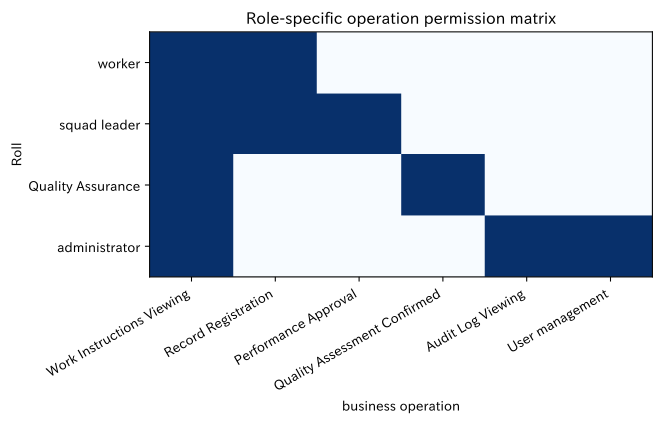
With RBAC (Role-Based Access Control), instead of assigning a large number of individual permissions to users, permissions are consolidated into job roles. Furthermore, narrow down the scope by attributes such as affiliated line, equipment, and factory. The authority table should be in a format that business managers and information systems can jointly review.
Check with Python
permission_matrix = pd.DataFrame({
    "operation": ["Work Instructions Viewing", "Record Registration", "Performance Approval", "Quality Assessment Confirmed", "Audit Log Viewing", "User management"],
    "worker": [1, 1, 0, 0, 0, 0],
    "squad leader": [1, 1, 1, 0, 0, 0],
    "Quality Assurance": [1, 0, 0, 1, 0, 0],
    "administrator": [1, 0, 0, 0, 1, 1],
}).set_index("operation")
display(permission_matrix.replace({1: "permission", 0: "refusal"}))

fig, ax = plt.subplots(figsize=(7, 4.5))
im = ax.imshow(permission_matrix.T, cmap="Blues", vmin=0, vmax=1, aspect="auto")
ax.set_title("Role-specific operation permission matrix")
ax.set_xlabel("business operation")
ax.set_ylabel("Roll")
ax.set_xticks(range(len(permission_matrix.index)), permission_matrix.index, rotation=30, ha="right")
ax.set_yticks(range(len(permission_matrix.columns)), permission_matrix.columns)
ax.grid(False)
plt.tight_layout()
plt.show()| worker | squad leader | Quality Assurance | administrator | |
|---|---|---|---|---|
| operation | ||||
| Work Instructions Viewing | permission | permission | permission | permission |
| Record Registration | permission | permission | refusal | refusal |
| Performance Approval | refusal | permission | refusal | refusal |
| Quality Assessment Confirmed | refusal | refusal | permission | refusal |
| Audit Log Viewing | refusal | refusal | refusal | permission |
| User management | refusal | refusal | refusal | permission |
Reading the results
This is a design example that limits all business operations to administrators and is limited to management functions. By avoiding the ‘I can do anything because I’m an administrator,’ you can minimize the impact of misoperations and account compromises. In practice, according to the division of duties, we add mutual checks and balances that do not treat applicants and approvers as the same person, automatic reflection of transfer dates, and quarterly authority inventory.
No.059: Switching Screens Displayed by Permissions
Meaning in Practice
By hiding menus that do not match permissions, users can focus on the tasks they need. However, hiding the screen is not a security authorization. To prevent direct URL input or API calls from developer tools, server-side checks are mandatory.
Approach to Analysis and Modeling
Necessary permissions are declared for each route, and display is decided based on the inclusion relationship with the set of permissions of logged-in users. 403 Forbidden doesn’t just show a blank screen; it shows the lack of permission, the application destination, and the path back to work.
Check with Python
route_rules = pd.DataFrame({
    "route": ["/work-orders", "/results/new", "/approvals", "/quality", "/admin/audit", "/admin/users"],
    "menu_label": ["work instruction", "Record Entry", "Performance Approval", "Quality Assessment", "Audit Log", "User management"],
    "allowed_roles": [roles, roles, ["squad leader"], ["Quality Assurance"], ["administrator"], ["administrator"]],
})

visibility = pd.DataFrame(index=route_rules["menu_label"], columns=roles)
for _, row in route_rules.iterrows():
    for role in roles:
        visibility.loc[row["menu_label"], role] = "display" if role in row["allowed_roles"] else "hide"
display(visibility)| worker | squad leader | Quality Assurance | administrator | |
|---|---|---|---|---|
| menu_label | ||||
| work instruction | display | display | display | display |
| Record Entry | display | display | display | display |
| Performance Approval | hide | display | hide | hide |
| Quality Assessment | hide | hide | display | hide |
| Audit Log | hide | hide | hide | display |
| User management | hide | hide | hide | display |
Reading the results
By organizing menus by role, you can present only the quality judgments necessary for quality assurance without showing the management menu to workers. Display control and API authorization can reduce discrepancies when generated from the same permission definition, but the final decision always rests with the API. After changing permissions, decide on the timing of re-acquisition or session updates so that old menus are not retained.
No.060: Protecting Authenticated APIs
Meaning in Practice
Protected APIs should not be allowed simply because the token exists. Check signatures, expiration dates, issuers, purpose of use, account status, roles, and target lines in a consistent order. Refusals are also subject to audit, but you must not log the tokens themselves or passwords.
Approach to Analysis and Modeling
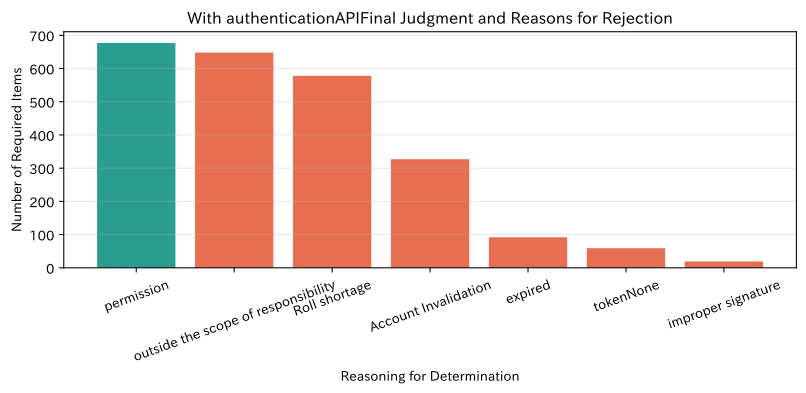
As a multi-layered defense, it determines (1) the form of credentials, (2) cryptographic verification, (3) claims, (4) account status, (5) roles, and (6) data range. Measuring the number of rejections per order of judgment makes it easier to distinguish between attack signs and configuration flaws. In HTTP, 401 unauthenticated is treated as a 403 if authenticated but insufficient permission is treated.
Check with Python
api_access["decision_reason"] = np.select(
    [
        ~api_access["token_present"],
        ~api_access["signature_valid"],
        api_access["token_expired"],
        ~api_access["account_status"].eq("active"),
        ~api_access["role_allowed"],
        ~api_access["scope_allowed"],
    ],
    ["tokenNone", "improper signature", "expired", "Account Invalidation", "Roll shortage", "outside the scope of responsibility"],
    default="permission",
)
decision_summary = api_access["decision_reason"].value_counts().rename_axis("Judgment").reset_index(name="number_of_cases")
decision_summary["composition_ratio_%"] = (decision_summary["number_of_cases"] / len(api_access) * 100).round(1)
display(decision_summary)

fig, ax = plt.subplots(figsize=(8.5, 4.2))
colors = ["#2A9D8F" if x == "permission" else "#E76F51" for x in decision_summary["Judgment"]]
ax.bar(decision_summary["Judgment"], decision_summary["number_of_cases"], color=colors)
ax.set_title("With authenticationAPIFinal Judgment and Reasons for Rejection")
ax.set_xlabel("Reasoning for Determination")
ax.set_ylabel("Number of Required Items")
ax.grid(axis="y", alpha=0.3)
plt.xticks(rotation=20)
plt.tight_layout()
plt.show()| Judgment | number_of_cases | composition_ratio_% | |
|---|---|---|---|
| 0 | permission | 677 | 28.2 |
| 1 | outside the scope of responsibility | 648 | 27.0 |
| 2 | Roll shortage | 578 | 24.1 |
| 3 | Account Invalidation | 327 | 13.6 |
| 4 | expired | 92 | 3.8 |
| 5 | tokenNone | 59 | 2.5 |
| 6 | improper signature | 19 | 0.8 |
Reading the results
Depending on the number of rejection reasons, you can distinguish whether the deadline is too short, whether the privilege list does not fit the work, or whether signature fraud is increasing. However, a low rejection rate does not necessarily mean safety. Automatically test for any endpoints with protection loopholes, and consider audit logs for reauthentication, approval, and tamper-resistant for privileged operations.
Practical Implications Seen Through Target Exercise
-
Successful authentication does not mean operation authorization
After identity verification, you need to determine your role and scope of responsibility for each request. -
The front end is the wiring,APIis a mandatory point.
Menu display control is effective for ease of use, but security boundaries are placed on the API side. -
On shared devices, session design directly impacts business quality.
It integrates user name display, no-operation period, logout during rotation, and rapid re-authentication. -
Delegate authority to duties rather than individuals, and conduct regular inventory.
Combine RBAC with affiliation scope to reflect deadlines for transfers, resignations, and support work. -
Treating rejection as a management metric rather than an abnormal termination
By separating authentication failures, missing roles, out-of-responsibility, and expired roles, you can detect signs of attack and inconsistencies in business design.
What is necessary for practical implementation
1. Organizing Operations and the ID Lifecycle
Define who can access which system and for how long at the time of joining, transferring, support work, leave, or retirement. Assign responsible persons for coordination with HR and organizational masters, applications and approvals, emergency access, and regular inventory.
2. Selection of Threat Models and Authentication Methods
Based on shared terminals, factory networks, external access, and the importance of quality information handled, select SSO, MFA, passkeys, terminal certificates, and session deadlines. We do not decide based solely on the method name; instead, we assume device loss, phishing, internal fraud, and communication interruptions.
3. Centralized authorization and automated testing
To prevent permission definitions from becoming fragmented across screens, APIs, and batches, common policies and auditable change procedures are established. Include unauthenticated, expired, missing roles, out-of-control, and immediately after permission changes in the test cases.
4. Monitoring and Incident Response
Monitor for consecutive failures, abnormal devices and time slots, privileged manipulations, and sudden increases in denials. No confidential information is left in the logs, and retention periods, viewing permissions, time synchronization, and reporting and containment procedures are specified.
5. On-site usability verification
In real-world environments including gloves, noise, number of devices, shift times, and communication quality, login completion time, reauthentication count, work interruptions, and inquiries are measured to update the balance with safety.
Conclusion
From No.051 to No.060, everything from separation of authentication and authorization to login, password, JWT, frontend status, logout, RBAC, screen switching, and API protection was checked as a factory work performance and quality record system.
What matters is not the introduction of JWT or login screens themselves, but the It is possible to consistently verify the individual, their duties, scope of scope, and valid time, and audit their judgments.. As seen in the aggregated fictitious logs, tracking not only the number of permits but also the reasons for denial, device-specific completion times, and remaining sessions provides materials to improve both security and business continuity.
For actual implementation, design according to existing ID infrastructure, division of duties, shared device operation, and legal and business partner requirements, and continue regular permission reviews and testing.
Consultations for Corporations
At Suri Kobo, we support the design and development of web systems and certification approval platforms to safely operate these processes in manufacturing, including business organization, data analysis, and AI and mathematical model development.
- We want to design login sessions based on shared terminals in factories.
- I want to organize authority at the department, factory, or line level.
- Want to incorporate authentication and authorization into analytics dashboards and AI APIs
- Want to check for permission leaks and audit logs in existing systems
- I want to organize the security requirements needed to move from PoC to production.
📩 Contact Us: surikobo.co.jp/contact
Please feel free to consult us first.