
100 Exercises / System Development / 100 System Development Exercises
Introduction to Database Design in Manufacturing | Orders and Products with Python and SQL
Explore keys, normalization, transactions, CRUD, and indexes with Python and SQLite, using fictional manufacturing orders and product records.
Turning Manufacturing Order and Item Data into a ‘Database for Decision-Making’: 10 Exercises on Database Design
On the manufacturing floor, information on orders, items, responsible persons, and delivery dates tends to be scattered across Excel and departmental systems. In this article, we will design A database that supports delivery timing and production prioritization step-by-step using a fictional precision parts manufacturer as the subject. Through No.021 to No.030, you will check the role of the database, primary and foreign keys, normalization, SQL CRUD, and indexes as a single business story.
The goal is not just to be able to write SQL. We aim to prevent duplication and orphan data, accurately aggregate item-specific demand and delivery deadlines, and maintain search performance even as the number of entries increases.
About this material This article adapts notebooks used in corporate training by Surikobo or its representative, Hiroshi Wayama, with permission from the participating companies. All data is fictional and does not represent actual companies or factory results.
Introduction: Practical Challenges in Manufacturing Covered in This Article
The target is the fictitious company ‘Kobo Seiki,’ which manufactures a wide variety of processed parts to order. Sales register orders, and production management aggregates quantities and delivery dates by item to assess the load. However, if there are inconsistencies in the same customer name notation, overwriting of unit prices by item masters, or loss of history due to deletion of contact members, even if aggregate values can be created, they cannot serve as a basis for decision-making.
Therefore, we create a data infrastructure that can answer the following questions.
- Which items need to be made, by when, and how many
- Can we consistently aggregate order amounts and quantities from the perspectives of customers, items, and personnel?
- Can invalid references and duplicate registrations be prevented at the time of registration, not after aggregation?
- Even if the data volume increases, can you keep the delivery date range search within the time you can wait on the business screen?
Common situations on site
The order ledger displays ‘Order Number, Customer, Contact Person, Item, Quantity, Unit Price, and Delivery Date’ in a single row. If there are multiple items in a single order, order information will be repeated line by line, resulting in omissions in customer names and contact person emails. Furthermore, if you directly enter the person in charge or item as strings, you can register values that don’t exist.
While small scales can be visually corrected, as the number of cases increases, monthly tallying variance checks, double counting, and delays in screen searches become routine. DB design is not just the IT department’s work; it is a Translation of on-site language into long-term durable data structures.
Why is this issue so difficult to judge?
Database design often involves conflicting decisions.
- Ease of input and consistency: Free input is fast but allows for some variation in the notation.
- Few tables and ease of change: While a single table is easy to understand, it preserves the same facts repeatedly.
- Search speed and update costs: Indexes speed up searches while increasing capacity and update processing.
- Current Value and History: The current unit price of the master and the unit price determined at the time of order are different facts.
Normalization alone does not settle every design decision. Express business invariants as constraints, measure common queries, and specify which historical values must be retained.
Exercises covered in this article
| No. | Theme | Practical Achievements |
|---|---|---|
| 021 | Role of the Database | Able to explain the role of reliable common records and aggregations |
| 022 | Tables, rows, and columns | Distinguish between business targets, individual cases, and attributes |
| 023 | primary key | Each record can be uniquely and immutably identified. |
| 024 | foreign key | Database ensures reference consistency between tables |
| 025 | normalization | Reduce duplicate updates and missed updates |
| 026 | User Table | Safely express the person in charge, authority, and employment status |
| 027 | Product & Order Table | Display many-to-many values on order details, allowing unit prices to be recorded at the time of order |
| 028 | SQL Registration | Orders can be registered on a per-transaction basis. |
| 029 | Search, Update, and Delete | You can switch between CRUD and history preservation |
| 030 | Index | Acceleration based on execution plans and measurements |
Preparing the Python environment
The standard-library sqlite3 module provides access to the SQLite database engine, pandas for the summary table, and matplotlib for visualization. Since SQLite runs on a single file or memory, constraints and SQL can be reproduced without an external server. Random number seeds are fixed so that the same data and results can be reproduced.
Show environment setup code
import sqlite3
import time
import numpy as np
import pandas as pd
import matplotlib.pyplot as plt
import japanize_matplotlib
from IPython.display import display

SEED = 20260711
rng = np.random.default_rng(SEED)
pd.set_option("display.max_columns", 12)
plt.style.use("default")
# Apply the Japanese font after resetting the plotting style.
japanize_matplotlib.japanize()

print("SQLite:", sqlite3.sqlite_version)
print("pandas:", pd.__version__)
print("random number seed:", SEED)SQLite: 3.50.4
pandas: 3.0.3
random number seed: 20260711Creation of Fictional Data
We generate 30 staff members, 120 clients, 60 items, 15,000 orders, and their detailed breakdowns. Separate the order header from the order statement, and store the Order Unit Price in the statement. This allows you to reproduce past order amounts even if the item master’s standard unit price changes in the future.
Show sample-data generation code
conn = sqlite3.connect(":memory:")
conn.execute("PRAGMA foreign_keys = ON")
conn.executescript("""
CREATE TABLE users (
  user_id INTEGER PRIMARY KEY, name TEXT NOT NULL,
  email TEXT NOT NULL UNIQUE, role TEXT NOT NULL CHECK(role IN ('sales','planner','admin')),
  is_active INTEGER NOT NULL DEFAULT 1 CHECK(is_active IN (0,1))
);
CREATE TABLE customers (
  customer_id INTEGER PRIMARY KEY, customer_name TEXT NOT NULL UNIQUE, region TEXT NOT NULL
);
CREATE TABLE products (
  product_id INTEGER PRIMARY KEY, product_code TEXT NOT NULL UNIQUE,
  product_name TEXT NOT NULL, category TEXT NOT NULL,
  standard_price INTEGER NOT NULL CHECK(standard_price > 0)
);
CREATE TABLE orders (
  order_id INTEGER PRIMARY KEY, order_no TEXT NOT NULL UNIQUE,
  customer_id INTEGER NOT NULL REFERENCES customers(customer_id),
  owner_user_id INTEGER NOT NULL REFERENCES users(user_id),
  order_date TEXT NOT NULL, due_date TEXT NOT NULL,
  status TEXT NOT NULL CHECK(status IN ('received','planned','shipped','cancelled')),
  CHECK(due_date >= order_date)
);
CREATE TABLE order_items (
  order_id INTEGER NOT NULL REFERENCES orders(order_id) ON DELETE CASCADE,
  line_no INTEGER NOT NULL, product_id INTEGER NOT NULL REFERENCES products(product_id),
  quantity INTEGER NOT NULL CHECK(quantity > 0),
  unit_price INTEGER NOT NULL CHECK(unit_price > 0),
  PRIMARY KEY(order_id, line_no)
);
""")

users = [
    (
        i,
        f"person in charge{i:02d}",
        f"user{i:02d}@kobo-factory.example",
        ["sales", "planner", "admin"][i % 3],
        1,
    )
    for i in range(1, 31)
]
customers = [
    (i, f"customer{i:03d}", ["Eastern Japan", "Central region", "Western Japan"][i % 3])
    for i in range(1, 121)
]
products = [
    (
        i,
        f"P-{i:04d}",
        f"precision parts{i:02d}",
        ["cutting", "sheet metal", "Assembly"][i % 3],
        int(800 + i * 95),
    )
    for i in range(1, 61)
]
conn.executemany("INSERT INTO users VALUES (?,?,?,?,?)", users)
conn.executemany("INSERT INTO customers VALUES (?,?,?)", customers)
conn.executemany("INSERT INTO products VALUES (?,?,?,?,?)", products)

n_orders = 15_000
base = pd.Timestamp("2025-01-01")
order_dates = base + pd.to_timedelta(rng.integers(0, 540, n_orders), unit="D")
lead_days = rng.integers(7, 46, n_orders)
orders = [
    (
        i,
        f"SO-{i:06d}",
        int(rng.integers(1, 121)),
        int(rng.integers(1, 31)),
        d.strftime("%Y-%m-%d"),
        (d + pd.Timedelta(days=int(ld))).strftime("%Y-%m-%d"),
        rng.choice(["received", "planned", "shipped"], p=[0.18, 0.27, 0.55]),
    )
    for i, (d, ld) in enumerate(zip(order_dates, lead_days), 1)
]
conn.executemany("INSERT INTO orders VALUES (?,?,?,?,?,?,?)", orders)

items = []
for order_id in range(1, n_orders + 1):
    for line_no in range(1, int(rng.integers(1, 5)) + 1):
        product_id = int(rng.integers(1, 61))
        price = products[product_id - 1][4]
        items.append((order_id, line_no, product_id, int(rng.integers(10, 501)), price))
conn.executemany("INSERT INTO order_items VALUES (?,?,?,?,?)", items)
conn.commit()

counts = pd.read_sql_query(
    """
SELECT 'person in charge' AS "Eligibility", COUNT(*) AS "number_of_cases" FROM users
UNION ALL SELECT 'customer', COUNT(*) FROM customers
UNION ALL SELECT 'item', COUNT(*) FROM products
UNION ALL SELECT 'Order received', COUNT(*) FROM orders
UNION ALL SELECT 'Order details', COUNT(*) FROM order_items
""",
    conn,
)
display(counts)| Eligibility | number_of_cases | |
|---|---|---|
| 0 | person in charge | 30 |
| 1 | customer | 120 |
| 2 | item | 60 |
| 3 | Order received | 15000 |
| 4 | Order details | 37344 |
No.021: Understanding the Role of Databases
Practical context
A database is not just a storage destination but a Common business records (single source of truth) referenced by multiple departments. Managing orders, items, and personnel in a single way, and no matter who aggregates the data, the results are the same—this is the premise for production quantity, delivery date responses, and sales forecasts.
Design and validation
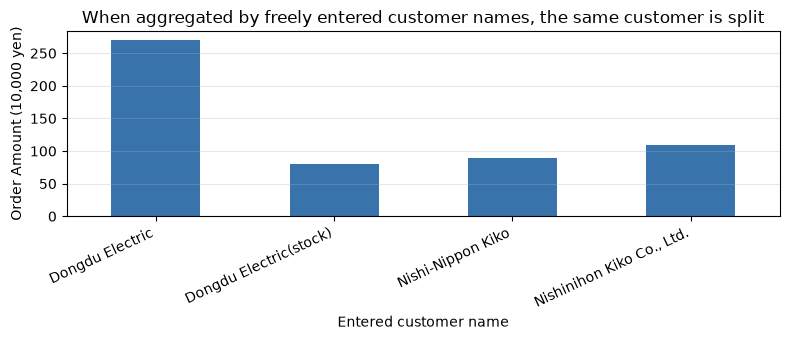
The four functions considered here are storage, constraints, queries, and concurrent updates. Compare a ledger with inconsistent customer names against ID-based records. The name-variation rate is defined as:
This visualizes the issue of unintentionally splitting the aggregation units.
Check with Python
ledger = pd.DataFrame(
    {
        "Customer Name": [
            "Dongdu Electric",
            "Dongdu Electric(stock)",
            "Dongdu Electric",
            "Nishi-Nippon Kiko",
            "Nishinihon Kiko Co., Ltd.",
        ],
        "order_amount_ten_thousand_yen": [120, 80, 150, 90, 110],
    }
)
raw_summary = ledger.groupby("Customer Name", as_index=False)[
    "order_amount_ten_thousand_yen"
].sum()
display(raw_summary)

ax = raw_summary.plot.bar(
    x="Customer Name",
    y="order_amount_ten_thousand_yen",
    legend=False,
    color="#3973ac",
    figsize=(8, 3.5),
)
ax.set_title(
    "When aggregated by freely entered customer names, the same customer is split"
)
ax.set_xlabel("Entered customer name")
ax.set_ylabel("Order Amount (10,000 yen)")
ax.grid(axis="y", alpha=0.3)
plt.xticks(rotation=25, ha="right")
plt.tight_layout()
plt.show()| Customer Name | order_amount_ten_thousand_yen | |
|---|---|---|
| 0 | Dongdu Electric | 270 |
| 1 | Dongdu Electric(stock) | 80 |
| 2 | Nishi-Nippon Kiko | 90 |
| 3 | Nishinihon Kiko Co., Ltd. | 110 |
Reading the results
Five records for two customers are split into four name groups. The total amount is unchanged, but customer-level demand and credit assessments can be wrong. Store a customer ID on each order and obtain the display name from the customer master so that name changes do not split the customer history.
No.022: Understanding the Relationship Between Table, Row, and Column
Practical context
The table is “identical type of object,” the row is “that one item,” and the column is “the attribute the object has.” For example, in an item table, one row corresponds to one item, and the column corresponds to item code, name, category, and standard unit price. If the granularity is ambiguous, it becomes difficult to search and aggregate, such as putting multiple items in a single cell.
Design and validation
During design, define what each row represents in a single sentence for each table. Columns generally have atomic values, and they also determine the unit, data type, and whether NULL is allowed. The number of rows corresponds to the number of observations, and the number of columns corresponds to the number of attributes, forming the basis for converting data into analytical data.
Check with Python
product_sample = pd.read_sql_query(
    """
SELECT product_id AS "Item ID", product_code AS "Item code", product_name AS "item name",
       category AS "Processing Classification", standard_price AS "standard_unit_price_yen"
FROM products ORDER BY product_id LIMIT 6
""",
    conn,
)
display(product_sample)
print(
    f"This table is {product_sample.shape[0]} rows × {product_sample.shape[1]} Column (display sample)"
)
print("1Line Definition: orderable1item")| Item ID | Item code | item name | Processing Classification | standard_unit_price_yen | |
|---|---|---|---|---|---|
| 0 | 1 | P-0001 | precision parts01 | sheet metal | 895 |
| 1 | 2 | P-0002 | precision parts02 | Assembly | 990 |
| 2 | 3 | P-0003 | precision parts03 | cutting | 1085 |
| 3 | 4 | P-0004 | precision parts04 | sheet metal | 1180 |
| 4 | 5 | P-0005 | precision parts05 | Assembly | 1275 |
| 5 | 6 | P-0006 | precision parts06 | cutting | 1370 |
This table is 6 rows × 5 Column (display sample)
1Line Definition: orderable1item
Reading the results
Each row is identified by an item ID, and the meaning and unit of each column are fixed. You can directly compute aggregates like “average unit price by processing category.” In practice, leaving not only column names but also work definitions, types, units, mandatory conditions, and update managers in the data dictionary can reduce interpretation differences between departments.
No.023: Designing the Primary Key
Practical context
The primary key is a value that identifies each row without duplication. Since item names and email addresses can be changed, it is easier to design with internal IDs as primary keys and separate UNIQUE constraints attached to business codes. This allows you to separate name changes from record identity.
Design and validation
A primary key uniquely identifies each row. Choose a non-null, concise value that rarely changes; stability and brevity are design recommendations, not guarantees of the constraint itself. Here, SQLite’s INTEGER PRIMARY KEY is a surrogate key, while a separate unique constraint protects the business product code.
Check with Python
tests = []
for label, sql, params in [
    (
        "Primary key duplication",
        "INSERT INTO products VALUES (1,?,?,?,?)",
        ("P-X", "test specimen", "cutting", 1000),
    ),
    (
        "Duplicate item code",
        "INSERT INTO products VALUES (999,?,?,?,?)",
        ("P-0001", "test specimen", "cutting", 1000),
    ),
]:
    try:
        conn.execute(sql, params)
        conn.rollback()
        tests.append((label, "Registered"))
    except sqlite3.IntegrityError as e:
        tests.append((label, "DBrefused", str(e).split(":")[0]))
display(pd.DataFrame(tests, columns=["Exam", "Results", "constraint error"]))| Exam | Results | constraint error | |
|---|---|---|---|
| 0 | Primary key duplication | DBrefused | UNIQUE constraint failed |
| 1 | Duplicate item code | DBrefused | UNIQUE constraint failed |
Reading the results
The database rejected duplicate primary keys and business code. Pre-checks on the app side alone cannot completely prevent simultaneous registrations. As the final line of defense, DB constraints are set up, and on the screen, constraint errors are converted into messages that users can correct.
No.024: Designing an foreign key
Practical context
Foreign keys ensure relationships such as “customers referenced by orders” and “items referenced by statements.” If you can register non-existent items in the itemized breakdown, they may be omitted from item-specific aggregation and cannot be linked to production instructions. This is called orphan data.
Design and validation
The child table references the primary key of the parent table and expresses referential consistency by constraints. Deletion behavior is also a matter of business judgment. In this example, only when an order is deleted will the statement be deleted in conjunction (ON DELETE CASCADE), and for customers and items, deletion during reference will be refused for history preservation.
Check with Python
result = []
try:
    conn.execute("INSERT INTO order_items VALUES (1, 99, 99999, 10, 1000)")
except sqlite3.IntegrityError as e:
    result.append(("Non-existent itemID=99999", "Registration refusal", str(e)))

joined = pd.read_sql_query(
    """
SELECT o.order_no AS "Order number", c.customer_name AS "Customer Name",
       p.product_code AS "Item code", oi.quantity AS "quantity"
FROM orders o
JOIN customers c ON c.customer_id = o.customer_id
JOIN order_items oi ON oi.order_id = o.order_id
JOIN products p ON p.product_id = oi.product_id
ORDER BY o.order_id, oi.line_no LIMIT 5
""",
    conn,
)
display(pd.DataFrame(result, columns=["Exam", "Results", "reason"]))
display(joined)| Exam | Results | reason | |
|---|---|---|---|
| 0 | Non-existent itemID=99999 | Registration refusal | FOREIGN KEY constraint failed |
| Order number | Customer Name | Item code | quantity | |
|---|---|---|---|---|
| 0 | SO-000001 | customer118 | P-0045 | 352 |
| 1 | SO-000001 | customer118 | P-0028 | 23 |
| 2 | SO-000001 | customer118 | P-0006 | 188 |
| 3 | SO-000001 | customer118 | P-0019 | 407 |
| 4 | SO-000002 | customer063 | P-0043 | 154 |
Reading the results
References to non-existent items are rejected by foreign key constraints, and normal items can be accessed up to the item code with JOIN. When reference relationships are guaranteed, the time spent on checking for missing values after joins decreases, improving the completeness of production quantity aggregation.
No.025: Understanding the Basics of Normalization
Practical context
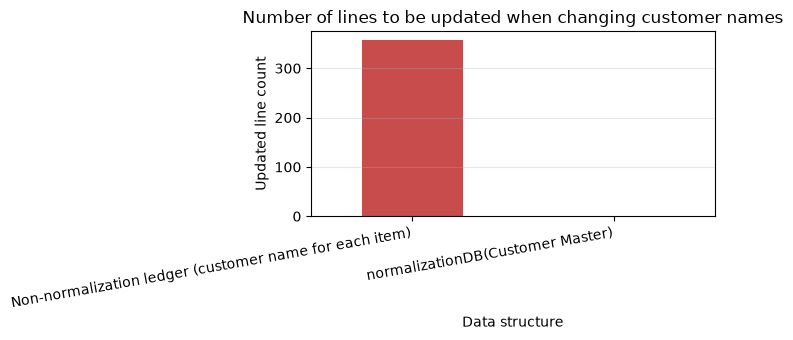
Normalization is a design that keeps a single fact in as one place as possible. If you repeatedly list the customer name or the contact person’s email in each line of the order statement, thousands of lines are updated during name changes, resulting in missed updates. By separating the deal with the master, you can limit the areas where you can make changes.
Design and validation
First normal form uses atomic cell values. Second normal form removes partial dependencies of non-key attributes on candidate keys; third normal form removes transitive dependencies through non-key attributes. For this example, estimate the cost of updating duplicated customer names as:
Here, is the number of rows requiring an update, and is the update cost per row. Fewer update locations reduce cost and inconsistency risk. The price agreed when an order was placed is a separate historical fact and remains on the order line.
Check with Python
customer_id = 42
duplicate_rows = conn.execute(
    """
SELECT COUNT(*) FROM orders o JOIN order_items oi ON oi.order_id=o.order_id
WHERE o.customer_id=?
""",
    (customer_id,),
).fetchone()[0]

comparison = pd.DataFrame(
    {
        "Design": [
            "Non-normalization ledger (customer name for each item)",
            "normalizationDB(Customer Master)",
        ],
        "Number of lines to update by changing the customer name": [duplicate_rows, 1],
        "Number of lines where updates may be missed": [max(duplicate_rows - 1, 0), 0],
    }
)
display(comparison)

ax = comparison.plot.bar(
    x="Design",
    y="Number of lines to update by changing the customer name",
    legend=False,
    color=["#c94c4c", "#3973ac"],
    figsize=(7, 3.5),
)
ax.set_title("Number of lines to be updated when changing customer names")
ax.set_xlabel("Data structure")
ax.set_ylabel("Updated line count")
ax.grid(axis="y", alpha=0.3)
plt.xticks(rotation=10, ha="right")
plt.tight_layout()
plt.show()| Design | Number of lines to update by changing the customer name | Number of lines where updates may be missed | |
|---|---|---|---|
| 0 | Non-normalization ledger (customer name for each item) | 357 | 356 |
| 1 | normalizationDB(Customer Master) | 1 | 0 |
Reading the results
In the unnormalized ledger, name updates are required for the number of customer 42 details, but in the normalized database, only one row is needed for the customer master. On the other hand, the unit price at the time of order, which reproduces past order amounts, is saved in the details without recalculating from the current standard unit price. It is essential to confirm whether there is a duplicate or a different fact from a different point in time.
No.026: Designing User Tables
Practical context
Users of business systems are not only the login agents but also the order recipients and approvers. You cannot distinguish between names by name alone; if a retiree is physically deleted, the history of past orders is lost. Internal ID, login identifier, permissions, and usage status are kept separately.
Design and validation
Emails are unique constraints, permissions are permissible restrictions, and status of employees and usage is indicated by flags. In production systems that handle passwords, the plaintext is not stored, but the appropriate password hash is stored. Additionally, authentication (identity verification) and authorization (operational permissions) are separated.
Check with Python
user_design = pd.DataFrame(
    [
        ("user_id", "INTEGER", "PRIMARY KEY", "Unchanged internal identifier"),
        ("name", "TEXT", "NOT NULL", "Screen display name. Repeatable"),
        ("email", "TEXT", "NOT NULL, UNIQUE", "Login identifier"),
        ("role", "TEXT", "CHECK", "sales / planner / admin"),
        (
            "is_active",
            "INTEGER",
            "0 or 1",
            "In case of retirement or suspension,0。 Leave a history",
        ),
    ]
)
display(
    user_design.set_axis(
        ["columns", "type", "restriction", "Operational Significance"], axis=1
    )
)

role_summary = pd.read_sql_query(
    """
SELECT role AS "Authority", COUNT(*) AS "Number of people", SUM(is_active) AS "Number of active users"
FROM users GROUP BY role ORDER BY role
""",
    conn,
)
display(role_summary)| columns | type | restriction | Operational Significance | |
|---|---|---|---|---|
| 0 | user_id | INTEGER | PRIMARY KEY | Unchanged internal identifier |
| 1 | name | TEXT | NOT NULL | Screen display name. Repeatable |
| 2 | TEXT | NOT NULL, UNIQUE | Login identifier | |
| 3 | role | TEXT | CHECK | sales / planner / admin |
| 4 | is_active | INTEGER | 0 or 1 | In case of retirement or suspension,0。 Leave a history |
| Authority | Number of people | Number of active users | |
|---|---|---|---|
| 0 | admin | 10 | 10 |
| 1 | planner | 10 | 10 |
| 2 | sales | 10 | 10 |
Reading the results
Separate display names from login identifiers and summarize active users by role. When someone leaves, set is_active=0, make the authentication logic reject that account, and revoke existing sessions while retaining historical order references. Changing the flag alone does not block login.
No.027: Designing Product and Order Tables
Practical context
A single order contains multiple items, and the same item appears in multiple orders. order_items dissolves this many-to-many relationship. The order header contains the customer, contact person, delivery date, and status, while the item details include the item, quantity, and unit price at the time of order.
Design and validation
The order amount is the total of quantity × unit_price per item.
Here, the price is not the item master’s current price, but the price agreed upon at the time of order. The compound primary key (order_id, line_no) prevents duplicate line numbers within the same order.
Check with Python
order_summary = pd.read_sql_query(
    """
SELECT o.order_no AS "Order number", c.customer_name AS "Customer Name", o.due_date AS "Delivery date",
       COUNT(*) AS "detailed quantity", SUM(oi.quantity) AS "Total quantity",
       SUM(oi.quantity * oi.unit_price) AS "order_amount_yen"
FROM orders o
JOIN customers c ON c.customer_id=o.customer_id
JOIN order_items oi ON oi.order_id=o.order_id
GROUP BY o.order_id, o.order_no, c.customer_name, o.due_date
ORDER BY "order_amount_yen" DESC LIMIT 8
""",
    conn,
)
display(
    order_summary.style.format(
        {"Total quantity": "{:,}", "order_amount_yen": "{:,.0f}"}
    )
)| Order number | Customer Name | Delivery date | detailed quantity | Total quantity | order_amount_yen | |
|---|---|---|---|---|---|---|
| 0 | SO-009825 | customer065 | 2025-01-20 | 4 | 1,703 | 9,021,395 |
| 1 | SO-001234 | customer036 | 2025-07-21 | 4 | 1,441 | 8,794,790 |
| 2 | SO-000830 | customer094 | 2025-07-27 | 4 | 1,571 | 8,755,530 |
| 3 | SO-010111 | customer100 | 2025-03-26 | 4 | 1,549 | 8,524,370 |
| 4 | SO-005332 | customer049 | 2025-08-29 | 4 | 1,626 | 8,478,525 |
| 5 | SO-003941 | customer099 | 2025-09-08 | 4 | 1,512 | 8,469,975 |
| 6 | SO-012227 | customer114 | 2025-10-07 | 4 | 1,500 | 8,457,810 |
| 7 | SO-012631 | customer096 | 2025-09-28 | 4 | 1,638 | 8,376,500 |
Reading the results
By combining headers and details, you can reproduce the quantity and amount of the order unit. The number of details and total quantity are separate KPIs. Since the number of details relates to planning and management load, while quantity relates to equipment load and material requirements, it is necessary to design without confusing management indicators with production indicators.
No.028: Registering Data with SQL
Practical context
Order registration requires successfully combining one header and multiple statements. If you fail midway and only the header remains, it can lead to orders with zero value or production instructions missed. Therefore, unified business processing is converted into transactions.
Design and validation
Transactions guarantee ACID characteristics, especially atomicity, whether everything is a complete success or a complete failure. Avoid embedding values into SQL strings, and use placeholders to perform type conversion and SQL injection countermeasures.
Check with Python
new_order = (20_001, "SO-020001", 10, 2, "2026-07-11", "2026-08-05", "received")
new_items = [(20_001, 1, 5, 120, 1275), (20_001, 2, 18, 80, 2510)]

with conn:  # If there are no exceptions, COMMIT; if exceptions, ROLLBACK
    conn.execute("INSERT INTO orders VALUES (?,?,?,?,?,?,?)", new_order)
    conn.executemany("INSERT INTO order_items VALUES (?,?,?,?,?)", new_items)

registered = pd.read_sql_query(
    """
SELECT o.order_no AS "Order number", oi.line_no AS "rows", p.product_code AS "item",
       oi.quantity AS "quantity", oi.unit_price AS "unit price",
       oi.quantity * oi.unit_price AS "amount"
FROM orders o JOIN order_items oi ON oi.order_id=o.order_id
JOIN products p ON p.product_id=oi.product_id WHERE o.order_id=20001
""",
    conn,
)
display(registered)
print("Total Orders:", f"{registered['amount'].sum():,} jpy")| Order number | rows | item | quantity | unit price | amount | |
|---|---|---|---|---|---|---|
| 0 | SO-020001 | 1 | P-0005 | 120 | 1275 | 153000 |
| 1 | SO-020001 | 2 | P-0018 | 80 | 2510 | 200800 |
Total Orders: 353,800 jpyReading the results
The order header and two details were registered as the same transaction, and the total amount on the item could also be confirmed. In practice, registration processes are designed to include order number numbering, idempotence keys to prevent duplicate transmission, registrants and registration dates, and user notifications in case of errors.
No.029: Searching, Updating, and Deleting Data with SQL
Practical context
CRUD is the basic operation of Create, Read, Update, and Delete. However, if order records are easily physically deleted, audits and tracking of sales discrepancies will not be possible. Transaction data is based on logical cancellation due to state changes, while masters are based on invalidation.
Design and validation
Search criteria are tailored to your business needs. Here, you will search for delivery dates and quantities by item for unshipped orders, and view the latest production load. Updates and deletions must always be confirmed in the number of cases and handled as transactions. In the demo, go back to SAVEPOINT and check the operation without changing the data.
Check with Python
due_demand = pd.read_sql_query(
    """
SELECT substr(o.due_date,1,7) AS "Delivery Date", p.category AS "Processing Classification",
       SUM(oi.quantity) AS "required quantity"
FROM orders o JOIN order_items oi ON oi.order_id=o.order_id
JOIN products p ON p.product_id=oi.product_id
WHERE o.status IN ('received','planned')
GROUP BY "Delivery Date", p.category ORDER BY "Delivery Date", p.category
""",
    conn,
)
display(due_demand.head(9))

conn.execute("SAVEPOINT crud_demo")
updated = conn.execute(
    "UPDATE orders SET status='cancelled' WHERE order_id=20001"
).rowcount
deleted = conn.execute(
    "DELETE FROM order_items WHERE order_id=20001 AND line_no=2"
).rowcount
after = conn.execute(
    "SELECT status, (SELECT COUNT(*) FROM order_items WHERE order_id=20001) FROM orders WHERE order_id=20001"
).fetchone()
conn.execute("ROLLBACK TO crud_demo")
conn.execute("RELEASE crud_demo")
print(
    {
        "Updated line count": updated,
        "Number of lines deleted": deleted,
        "Status during operation and number of details": after,
        "Final result": "Rolled back",
    }
)| Delivery Date | Processing Classification | required quantity | |
|---|---|---|---|
| 0 | 2025-01 | Assembly | 19598 |
| 1 | 2025-01 | cutting | 16395 |
| 2 | 2025-01 | sheet metal | 23033 |
| 3 | 2025-02 | Assembly | 69908 |
| 4 | 2025-02 | cutting | 64133 |
| 5 | 2025-02 | sheet metal | 74597 |
| 6 | 2025-03 | Assembly | 86426 |
| 7 | 2025-03 | cutting | 86369 |
| 8 | 2025-03 | sheet metal | 100092 |
{'Updated line count': 1, 'Number of lines deleted': 1, 'Status during operation and number of details': ('cancelled', 1), 'Final result': 'Rolled back'}Reading the results
Through searching, we were able to convert unshipped quantities into the required quantities by delivery month and processing category. This is input for capability adjustments and outsourcing decisions. You can get the number of eligible lines for updates and deletions, and after the demo, the results were rolled back. For actual order cancellations, the status, reason for cancellation, the executor, and the time are retained, while physical deletions are limited according to retention periods and laws.
No.030: Use indexes to speed up searches
Practical context
The screen for searching orders by delivery range and status is routinely used by production management. Full line scanning slows down proportionally with the number of entries, leading to screen wait times and batch delays. Indexes create paths to rows that meet the conditions, like an index in a book.
Design and validation
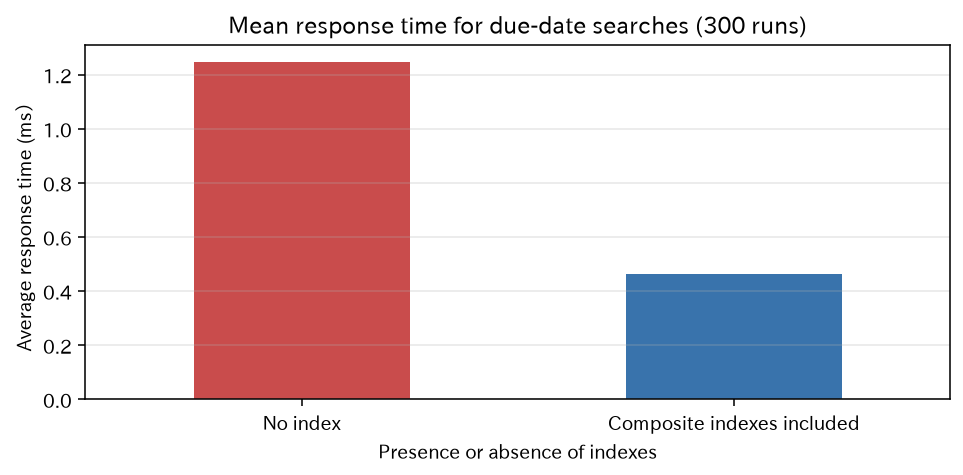
Instead of increasing the index with guesswork, check actual queries, execution plans, and response times. The order of the column is important for composite indexes. For this WHERE status=? AND due_date BETWEEN ? AND ?, (status, due_date) is used as a candidate and repeatedly measured under the same conditions before and after creation.
Check with Python
query = """
SELECT order_id, order_no, due_date FROM orders
WHERE status=? AND due_date BETWEEN ? AND ? ORDER BY due_date
"""
params = ("planned", "2026-01-01", "2026-03-31")


def plan_text():
    rows = conn.execute("EXPLAIN QUERY PLAN " + query, params).fetchall()
    return " / ".join(row[3] for row in rows)


def benchmark(repeats=300):
    start = time.perf_counter()
    for _ in range(repeats):
        conn.execute(query, params).fetchall()
    return (time.perf_counter() - start) * 1000 / repeats


conn.execute("DROP INDEX IF EXISTS idx_orders_status_due")
plan_before, ms_before = plan_text(), benchmark()
conn.execute("CREATE INDEX idx_orders_status_due ON orders(status, due_date)")
plan_after, ms_after = plan_text(), benchmark()

performance = pd.DataFrame(
    {
        "Condition": ["No index", "Composite indexes included"],
        "average_response_ms": [ms_before, ms_after],
        "Execution plan": [plan_before, plan_after],
    }
)
display(performance.style.format({"average_response_ms": "{:.3f}"}))

ax = performance.plot.bar(
    x="Condition",
    y="average_response_ms",
    legend=False,
    color=["#c94c4c", "#3973ac"],
    figsize=(7, 3.5),
)
ax.set_title("Mean response time for due-date searches (300 runs)")
ax.set_xlabel("Presence or absence of indexes")
ax.set_ylabel("Average response time (ms)")
ax.grid(axis="y", alpha=0.3)
plt.xticks(rotation=0)
plt.tight_layout()
plt.show()| Condition | average_response_ms | Execution plan | |
|---|---|---|---|
| 0 | No index | 1.246 | SCAN orders / USE TEMP B-TREE FOR ORDER BY |
| 1 | Composite indexes included | 0.464 | SEARCH orders USING INDEX idx_orders_status_due (status=? AND due_date>? AND due_date |
Reading the results
The execution plan shifts from full table scanning (SCAN) to searching using composite indexes (SEARCH), and the average response time for the same query is also reduced. Since absolute time varies depending on the execution environment, do not overestimate the magnification alone. Adopt based on write frequency, selectivity, capacity, and actual slow queries, and delete unnecessary indexes.
Design and operational considerations
What can be seen through these ten exercises is that data quality and search performance cannot be compensated for by the analysis process alone.
- Decide on identifiers first: Identify targets by primary keys rather than names, and set unique constraints to business code.
- Protecting relationships with constraints: Prevent orphan data from registering with an foreign key.
- Distinguishing the point of fact: Do not confuse the current standard unit price with the order price history.
- Renew by business unit: Register order headers and details in bulk through transactions.
- Measure and improve performance: Design the index by reviewing the execution plan and response time for frequently used searches.
When these are in place, the likelihood of recalculating KPIs such as item-specific demand, delivery time, and order amounts increases, and the input quality of dashboards and AI predictions also improves.
Preparing for production
In actual systems, instead of directly transferring the notebook schema to production, the next step is agreed upon with the relevant departments.
- Business terminology and granularity: Definitions and the meaning of one line for order, preliminary notice, item, revision, lot, and shipment
- Constraints and Exceptions: Handling of partial deliveries, unit price revisions, item substitutions, order cancellations, and personnel transfers
- History & Audits: Before and after changes, performer, time, reason, data retention period
- Non-functional requirements: Peak count, response time, availability, backup, recovery goals
- Security: Least privilege, authentication & authorization, encryption, personal information, audit logs
- Migration and Operations: Reconciling duplicate entities in existing ledgers, rehearsals, reconciliation, schema change procedures, monitoring
Especially for migrating existing data, duplicate primary key candidates, foreign key mismatches, and date, unit, and character codes are pre-profiled. Managing business KPIs and database constraints in the same requirements list makes it easier for development and field teams to align their understanding.
Conclusion
In No.021 to No.030, we designed a database using hypothetical manufacturing data. We set the granularity of tables, rows, and columns, maintained consistency with primary and foreign keys, and reduced missed updates through normalization. Furthermore, order registrations were transacted to confirm the safe handling of CRUD and the index design based on execution plans.
Good database design is not about having clean tables, but about consistently reproducing the necessary numbers while accepting changes and exceptions that occur on site. In the next phase, we will develop this schema into a form that can be safely used from APIs and business interfaces.
Business inquiries
At Surikobo, we support business organization in manufacturing, data model design, quality diagnosis of existing Excel and core data, development of analysis platforms and business systems, and in-house production training. You can consult from stages such as “Aggregate values differ by department,” “I want to database existing ledgers,” or “I want to create data structures that can withstand future AI applications.”
📩 Contact Us: www.surikobo.co.jp/contact Contact us to discuss your requirements.